Use your Claude subscription with Reelwright on the web
The web edition of Reelwright, at reelwright.diy/app, works with your own Claude Pro or Max plan. Your own Claude, Claude Code or the Claude app, connects to Reelwright's MCP server and works on your shows from there: it reads them, writes scripts, directs episodes and proposes changes, and what it proposes appears in Studio for you to approve. It works as you, with your role in each show.
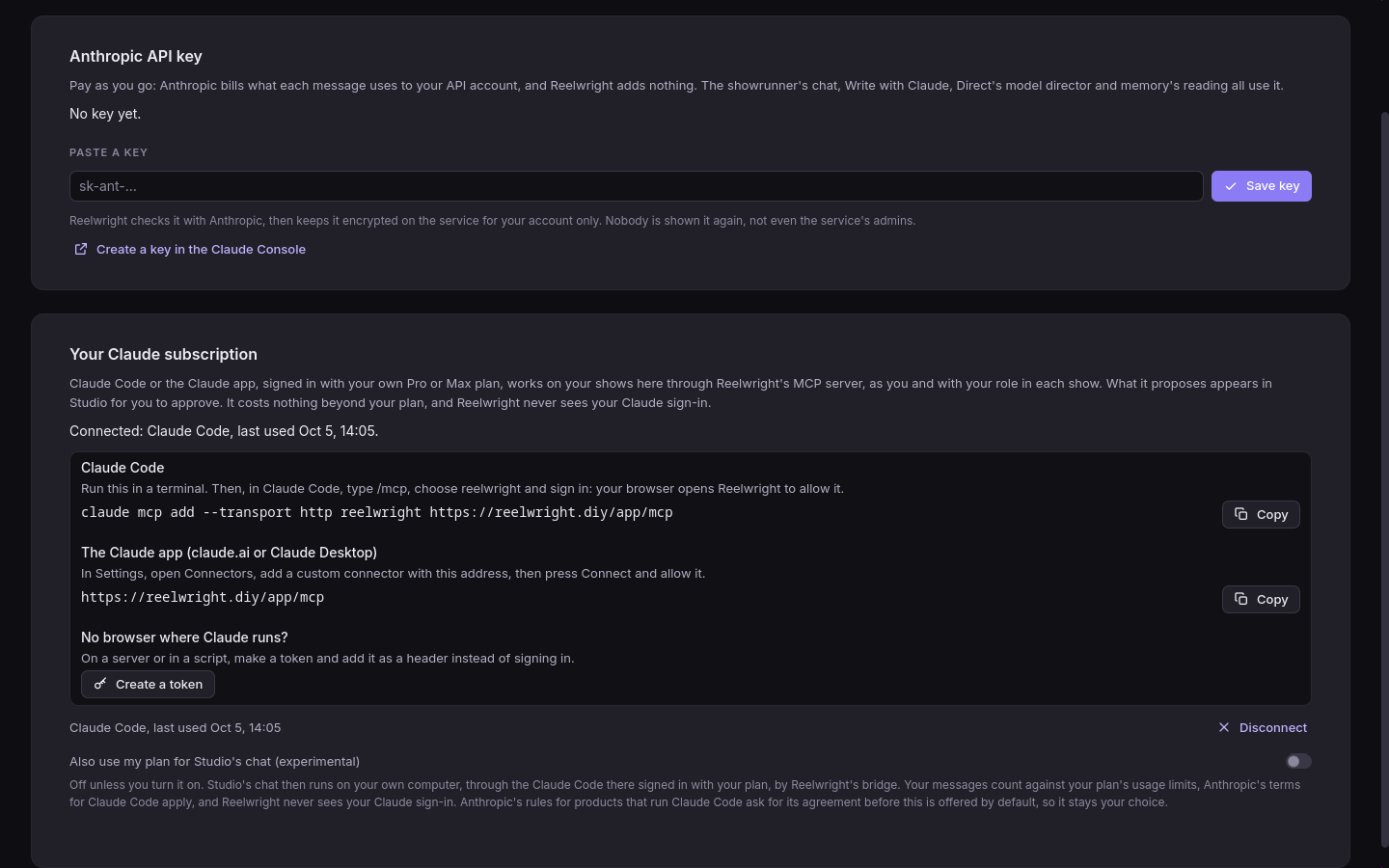
Reelwright never sees your Claude sign-in: you sign in to Claude in Claude's own app, and to Reelwright in your browser. Until Claude is connected, Studio's chat opens on the ways in, your own Claude first: Use Reelwright from Claude (below), then Chat using my Claude plan for Studio's own chat on your plan. An Anthropic API key is the last way, folded under Use an Anthropic API key instead: paste the key there and press Enter, and the showrunner answers in the same chat. Settings › Claude (Ctrl+, or the gear at the foot of the rail, or More ways to connect in the chat) has it too, under Anthropic API key, where you can also test, replace and remove it.
The address of Reelwright's MCP server is:
https://reelwright.diy/app/mcp
Settings › Claude in the web edition (or Connect Claude… anywhere it is offered) has it and the command below ready to copy under Your Claude subscription, and lists your connections. Its top says how Claude is connected now, and which way is used for what.
With Claude Code
In a terminal, run:
claude mcp add --transport http reelwright https://reelwright.diy/app/mcpSign in:
claude mcp login reelwright(or, inside Claude Code, type
/mcp, choose reelwright, then Authenticate). Your browser opens Reelwright: sign in with the code it emails you, then choose Allow on "Allow Claude to work on your shows?". Claude Code saysAuthenticated with "reelwright".Ask Claude for what you want ("make the engineer older", "write the cold open"). It starts on the show you last opened in Studio; ask it to list your shows or to switch to another one.
claude mcp list shows whether it is connected.
With the Claude app (claude.ai or Claude Desktop)
The quickest way: in Studio's chat, press Use Reelwright from Claude, its first way in (or, in Settings › Claude, Open claude.ai with Reelwright filled in). claude.ai opens on Add custom connector with the name and the address filled in; press Add, then Connect, and Allow when Reelwright asks. A connector added on claude.ai is in Claude Desktop and the Claude mobile app too. By hand:
- In Claude, open Customize › Connectors and choose Add custom connector.
- Name it Reelwright, give it the address
https://reelwright.diy/app/mcpand press Add. If Claude asks how to sign in, choose Sign in now. Either way it offers to name itself works: Use Claude's published identity (Reelwright reads the description Claude publishes of itself) or Register automatically. - Press Connect: Reelwright opens in your browser to sign in and allow it. The connector then shows Connected.
Then ask Claude about your shows in any conversation, with the Reelwright connector on.
Without a browser
Over SSH, claude mcp login reelwright --no-browser prints the address to open in a browser
elsewhere; paste back the address the browser lands on when Claude Code asks for it.
Where Claude runs with no one to sign in at all (a server, a script), make a token instead: in Settings › Claude, Your Claude subscription, press Make a token. Studio shows the command with the token in it, once:
claude mcp add --transport http reelwright https://reelwright.diy/app/mcp \
  --header "Authorization: Bearer rwp_…"
Copy it then: Reelwright keeps only a fingerprint of it and cannot show it again. A token works for a year unless you disconnect it.
What Claude can do
- Read your shows and the ones shared with you: characters, sets, scripts, episodes, memory, and previews as pictures.
- Propose: every change it makes is a proposal that waits in Studio, where you (or whoever edits the show) approve or reject it. If Studio is open on the show, the proposal appears as it is made.
- Decide only when you ask in so many words: approve, reject, undo, redo, lock and unlock. Claude Code asks you before each of these.
- Comment: list a show's comment threads, start one on the show, a character, script lines or a moment on the timeline, and reply, as you would in Studio.
- Never more than your role allows. In a show you review, it reads and comments but changes nothing; in a show you can only view, it only reads.
- Tools that call a model themselves (the model director, show memory's model pass) use your own Anthropic API key if you connected one, within the cap the service sets you; without one they say so, and Claude can direct with the heuristic director instead.
Studio's own chat on your plan
Studio's chat in the web edition can run on your plan too, through the Claude Code on your own computer, by a small helper that runs there. It is off unless you choose it.
In Studio's chat, while Claude is not connected, press Chat using my Claude plan (it says it needs a small helper on your computer). Studio shows one command to copy, with a pairing code in it that works once, for ten minutes.
On your computer, with Claude Code installed and signed in with your plan (
claude auth login; on a computer with no browser,claude setup-token, with the token it prints inCLAUDE_CODE_OAUTH_TOKEN), and Reelwright installed, paste it in a terminal:reelwright claude bridge --service https://reelwright.diy/app --pair ABCD-EFGHIt says "connected" and keeps running; stop it with Ctrl-C. The helper keeps its own token on your computer, readable by you only, so the same command without
--pairstarts it again later. You never paste a token.Studio notices the helper by itself, puts the chat on your plan, and its header says "Connected: your Claude plan, through your computer".
Have the installed Reelwright Studio on that computer, signed in? Turn on Let this computer
run my web chat on my Claude plan in its Settings › Claude instead: it runs the helper for
you. (Settings › Claude in the web edition still has the old way too: Make a token, then
Also use my plan for Studio's chat, then REELWRIGHT_TOKEN=rwp_… reelwright claude bridge --service ….)
Then talk to the showrunner in Studio's chat as usual. Your messages go to your computer, the Claude Code there answers on your plan with the show's tools, and the answer streams back into Studio; what it proposes waits for you there. Each message counts against your plan's usage limits. If the helper is not running, the chat's header says so, with the command that starts it again, and Connect Claude opens Settings › Claude, where you can switch back to an API key. Reelwright never sees your Claude sign-in: the bridge runs the Claude Code on your computer exactly as you would.
Disconnecting
Settings › Claude, Your Claude subscription lists each Claude you allowed and each
token you made, with when it was last used. Disconnect stops it at once. You can also
remove Reelwright from Claude Code (claude mcp remove reelwright) or from Claude's
connectors. Signing in lasts while you use it: Claude's access refreshes every hour, and a
connection unused for 30 days ends by itself.
Questions
- Is this allowed by Anthropic's terms? Yes: Claude Code and the Claude apps are made to use MCP servers like this one, each person on their own plan. Reelwright never handles your Claude sign-in and never runs Claude on your plan itself.
- Does it cost anything on Reelwright? No. What Claude does counts against your Claude plan's usage, as anything else you do in Claude.
- "Needs authentication" in
claude mcp list? Runclaude mcp login reelwright(or, in Claude Code,/mcp, reelwright, Authenticate). - It stopped working. You may have disconnected it in Studio, or the service's owner signed
you out everywhere: sign in again with
claude mcp login reelwright, or with the connector's Connect in Customize › Connectors.
How it is built is in Claude on the web, over MCP.