M14: Immersive editors for World, Cast and Sets
Status: design, 2026-10-05 (task #222); phase 1, the set explorer, and phase 2, the character studio, built 2026-10-05 (see "Phase 1: what was built" and "Phase 2: what was built"); phase 3, editing a set in 3D, built (see "Phase 3: what was built"); phase 4, previs, built 2026-10-06 (see "Phase 4: what was built"); the core of phase 5, the style lab and a style made from scratch, built 2026-10-06 (task #224, see "Phase 5, its core: what was built"). It is a critical look at how a showrunner sees and changes what was built, and a phased plan for editors that show it live.
Read with docs/adr/0004-3d-stage-2d-characters.md, docs/adr/0011-ux-surfaces.md,
docs/design/m7-redirection.md ("Stage"), docs/design/m10-3d-characters.md,
docs/design/m12-web-service.md ("The same picture as the desktop") and
docs/design/m13-shared-shows.md.
The question
The owner, 2026-10-05:
On the world page .. it has sections for SHOW, THEME, STYLES, and BIBLE … where and how is a user to "visually" experience what was built? … I'm just wondering if each should be tied into their own immersive editors that allow users to explore the 2d/3d spaces of world, cast, sets in more detail.
The short answer:
- Today the show can be seen in two ways only. The timeline plays an episode live. Anything else is a still that the daemon renders on request: 10 to 15 s each on this desktop, and about 13 s for a model sheet on the service. World, Cast and Sets are lists of names. Each name opens a form of fields with one such still on top. Nothing can be turned, walked round, looked through or moved by hand.
- Yes: each should open into an editor, and that costs less than it sounds. The engine already runs inside Studio, on the desktop and in the browser: the timeline plays episodes live with it. Every builder an editor needs is there, and most are fast enough (measured below). What is missing is the viewport, selection and gizmos around them, plus a few small protocol additions.
- The order, by value to a showrunner. Sets come first, because every shot is taken in a set. Then Cast, because today nobody can tune a character without the showrunner. Then editing a set in 3D, previs of a scene, World's look book and style lab, voice auditions, and the bible as a story map.
- This is not a 3D modelling tool. A show is parameters, not meshes. M14 adds no modelling, sculpting, rig building, keyframe posing, shader graphs or VR. The editors change the same parameters the showrunner changes, by direct manipulation, and show the result live.
What exists
World, Cast and Sets today
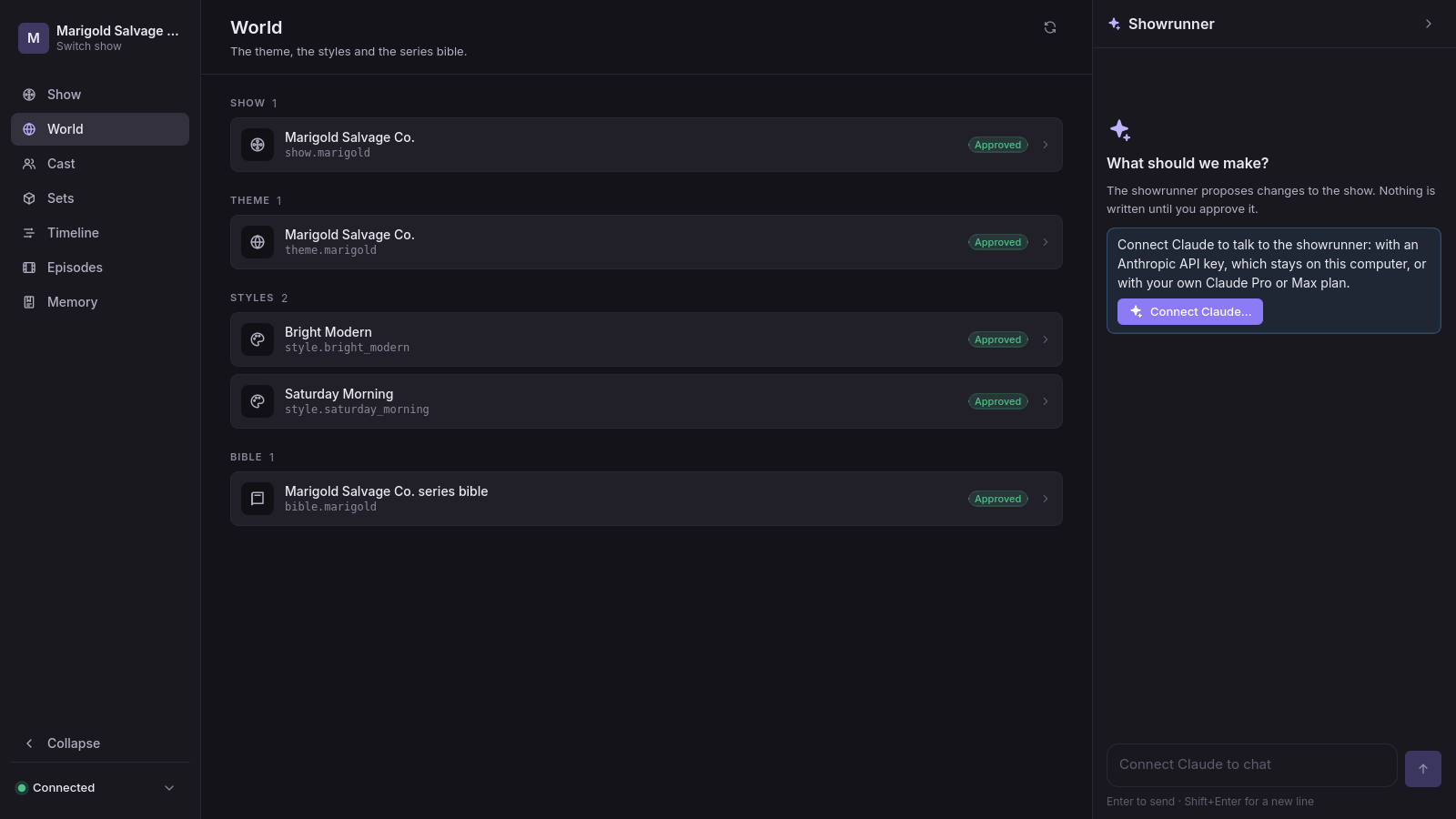
One component draws all three sections.
RwShowBrowser(engine/addons/reelwright/ui/rw_show_browser.gd) lists the show's documents by kind (SECTION_KINDS):- World: the show's settings (
ShowManifest), the theme, the styles and the bible; - Cast: the characters and their patterns;
- Sets: sets, props, effects, graphics and their patterns.
Each row is a name, an id and badges for status, locks and drift.
- World: the show's settings (
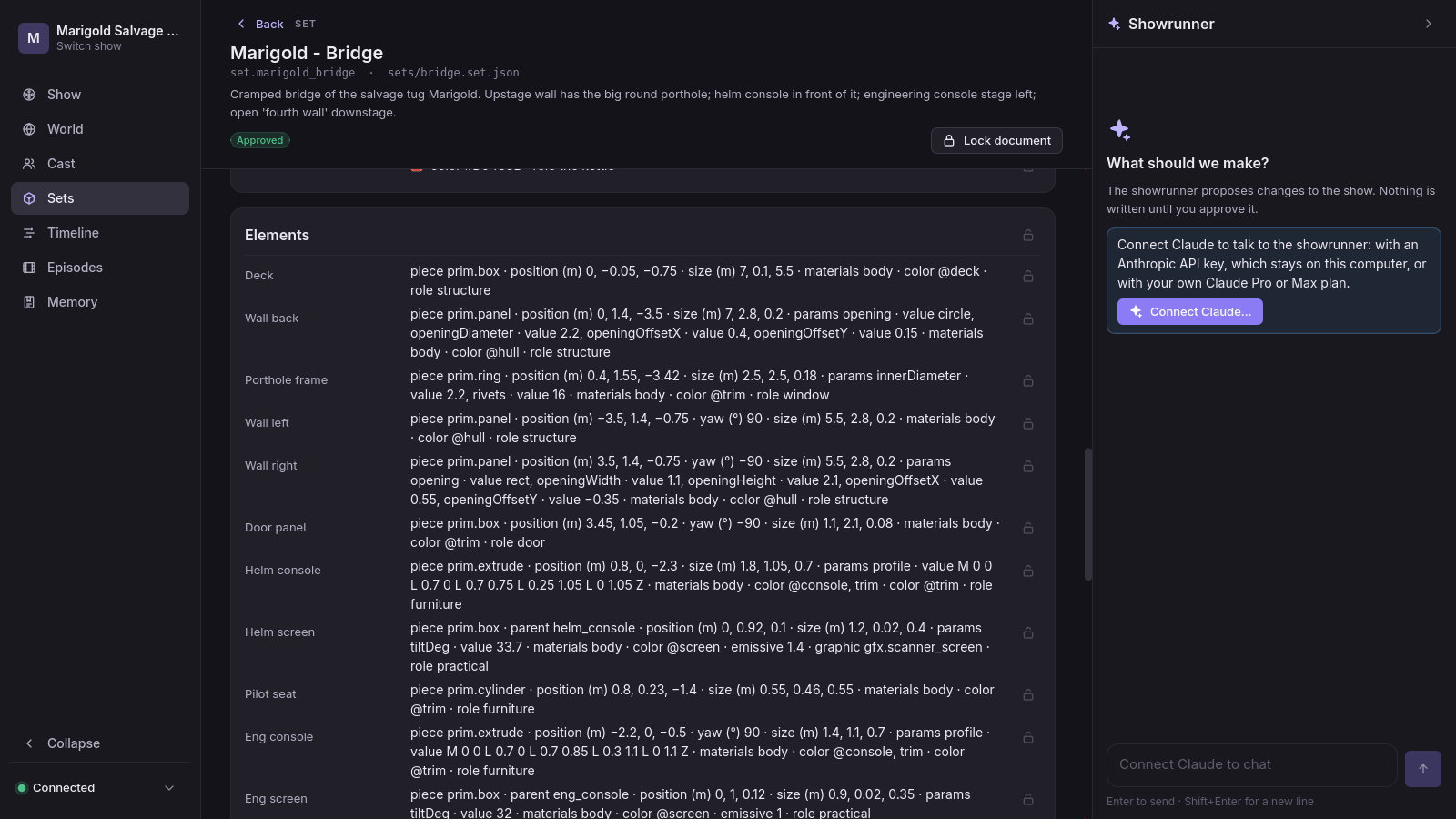
A document opens as a form.
RwDocumentView(rw_document_view.gd) shows a header, then one preview (KINDS): a model sheet, a line-up, set views, a prop or effect sheet, or a style swatch. The theme, the bible and the show have no preview. Below it, each part of the document is a card of labelled values.The form is read-only. Locks are the only thing a person can set there. Cast has New character and Sets has New set, both drawn from a pattern with no model. Everything else goes through the showrunner, which needs a key or a Claude plan: a hair color, a mark's place, a camera's lens. Someone with no key cannot move a mark.
A card says what a set is in numbers. A mark on the bridge reads "position (m) 0.8, −1.4 · facing (°) 180 · posture sit · seat pilot_seat". The engineering console's shape is SVG path data: "profile · value M 0 0 L 0.7 0 L 0.7 0.85 …". Nobody can judge from that whether the helm mark is in front of its console.
Pictures arrive late. A preview is an engine job (
core/src/studio/previews.ts). The daemon runs one at a time and caches the result. The first look at the bridge was a spinner, then five pictures from its camera setups, 13.8 s later. The pictures show no marks, no characters and nothing to say where each camera stands.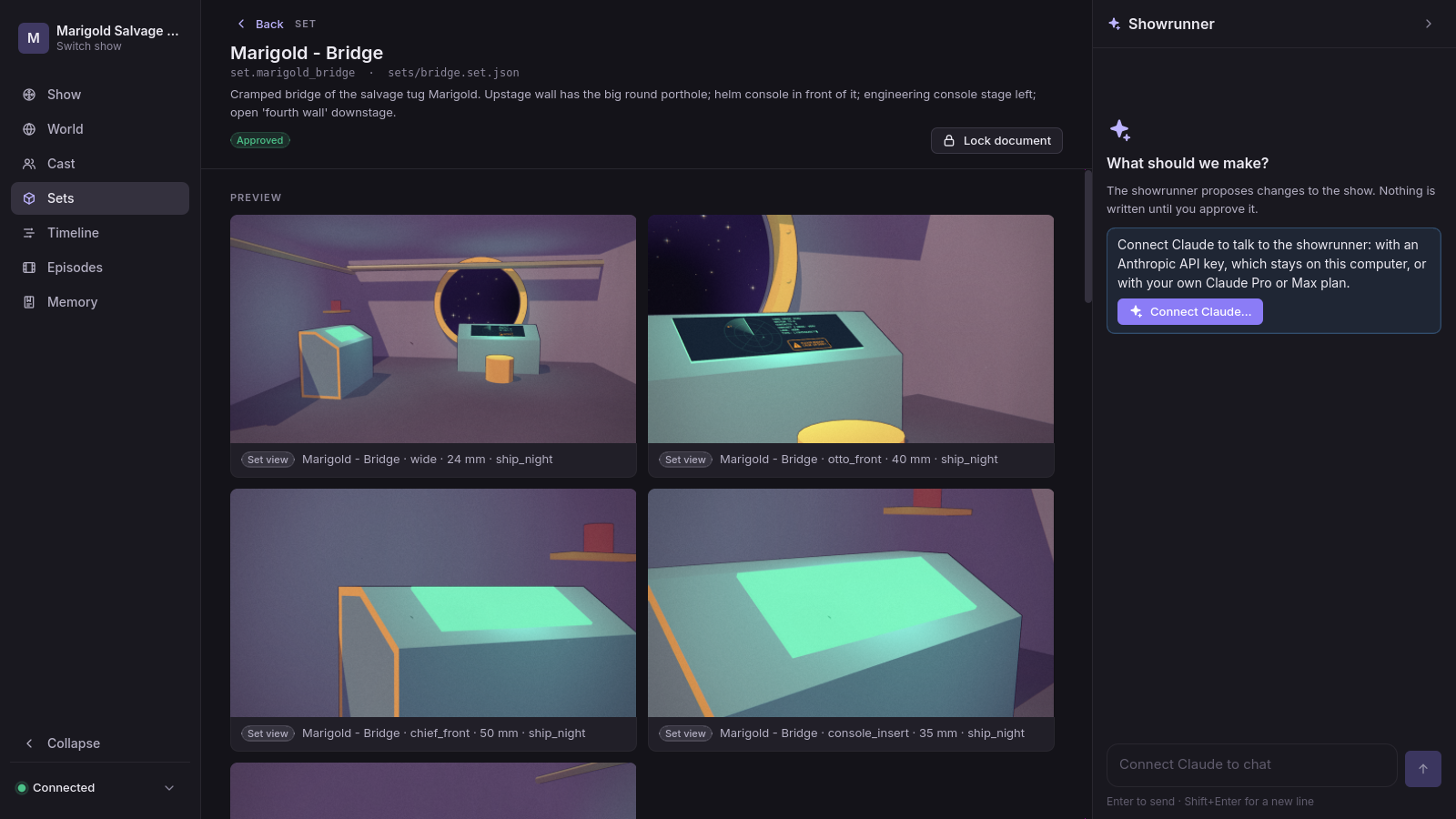
A style is shown on someone else's content. The style swatch (
RwStyleSwatchTask) draws a fixed sample fromlibrary/: a character and a room that belong to no show. A showrunner choosing a style never sees it on Otto in the bridge.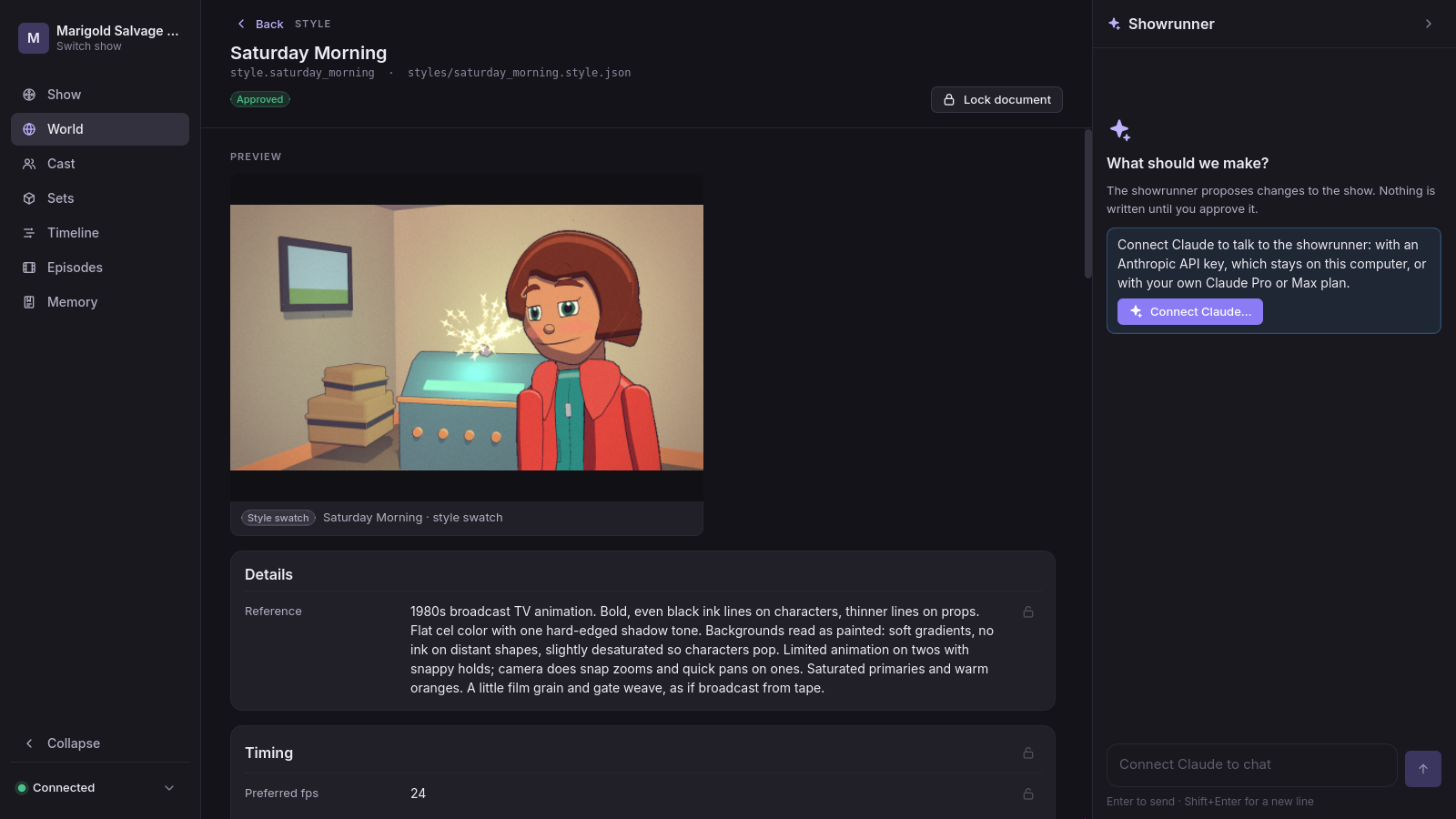
The model sheet is good. It shows the turnaround, 21 expressions, the mouth chart, the colors and the line-up (
RwModelSheetTask), and it is the approval picture for canon (ADR-0007). It is still one still: no turning between its angles, no gesture, no line said.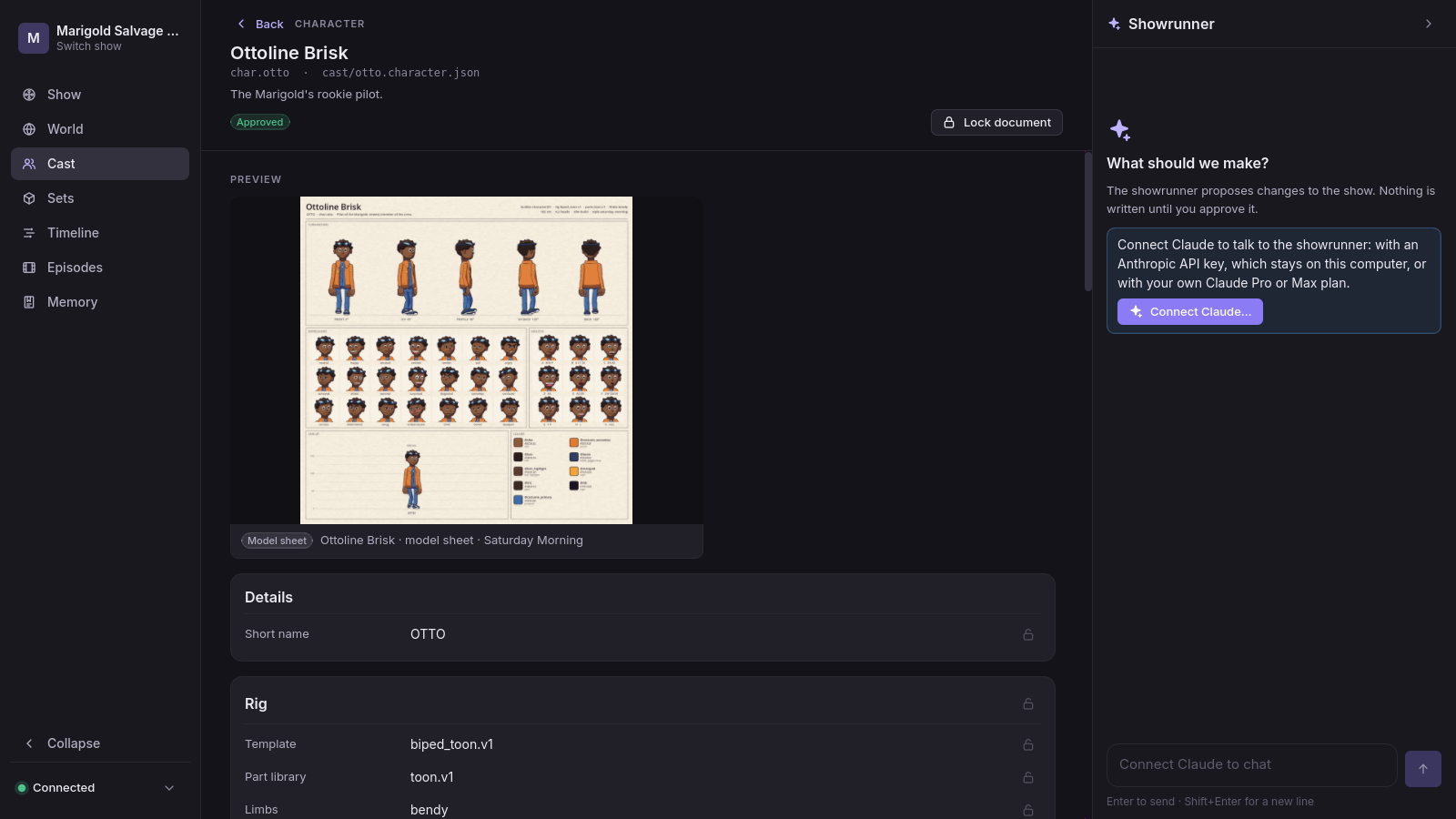
The stage is the one spatial editor. The timeline's stage (
RwTimelineStage,RwStageModel,RwStagePlan,docs/design/m7-redirection.md) draws the scene's set from above at the playhead. A person can drag someone onto a mark, turn them, and orbit the shot's camera; each drag is anedit_episodeedit, applied as made. It is top-down only, so it shows no height (the Chief hidden behind his console, pipes overhead). It cannot look through another setup, and it exists only inside an episode.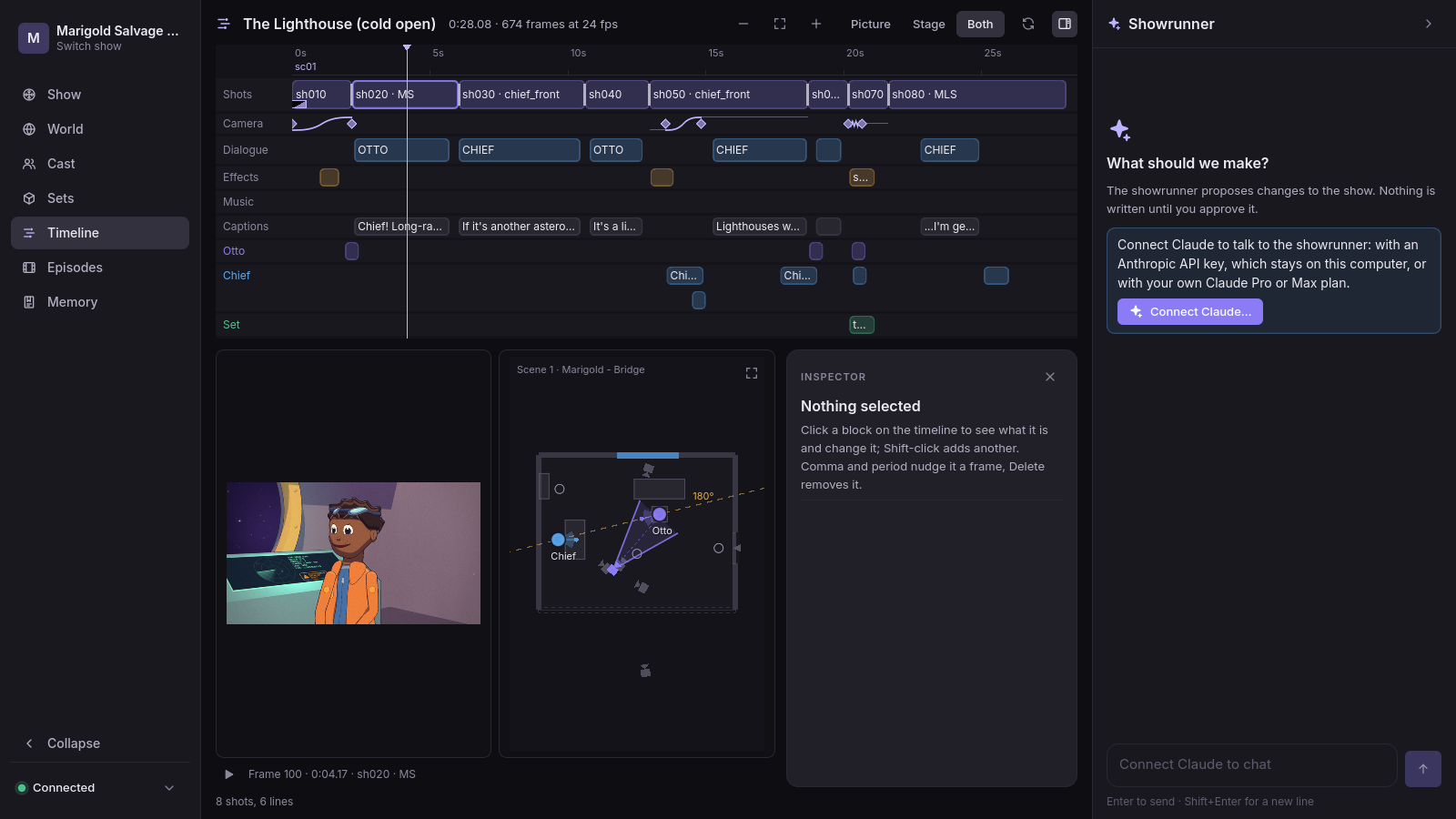
What the engine already draws live inside Studio
Studio plays an episode live. episode.playback writes a frames job, and RwLivePlayer builds
its Timeline with RwTimelinePlayer into a SubViewport in Studio's own process. The desktop
draws with Forward+. The browser draws with Compatibility: WebGL 2 on one thread, with the
web preset's thread_support=false. The two match the server's stills to within about two
levels (tools/web/shots.ts). An editor can reach every builder it needs the same way:
| Building block | What an editor gets | Measured |
|---|---|---|
RwSetBuilder.build(design, style, lighting) |
a set in its style under one lighting preset | bridge (16 elements) 82–195 ms; engine room (21) 1.28–1.38 s |
RwSetBuilder.relight |
another lighting preset on a built set | 1–7 ms |
RwComposition, RwShotView.aim, RwSet.view_from, RwPost |
a camera on it, with wild walls and the style's post pass, as a render draws it | first frame after a build 2.1 s (shader pipelines), then 11–34 ms |
RwCardFactory.create and apply(state, camera, lighting) with an RwActorState |
a character in any posture, gesture, expression, mouth shape, look, held prop or float | 2D card: made in 20–80 ms, posed at a new angle in 76–100 ms (worst 257 ms). 3D figure: made in 8–9 ms, posed in 0.3 ms |
RwModelSheetTask (_figure_lighting, _add_figure_view, _add_figure) |
the model sheet's studio light and its views of a card or a figure | — |
RwProp.build, RwPropGripState |
a prop standing, or held in a hand as an episode holds it | — |
RwStyle.from_spec, RwStyle.FIELD_USES |
a style resolved, and for each field whether the engine, the characters or only the core reads it | 0.4 ms |
RwStagePlan |
each piece's footprint as a box (center, half extents, yaw, bottom, top): picking without collision shapes | — |
RwSetBuilder.geometry_hash |
proof that two builds made the same geometry | — |
These were measured on 2026-10-05 on the Linux desktop (RX 6700 XT, Forward+), in the process as an editor would build them, with scratch probes that are not committed. The machine was at a load of about 70 on 24 cores, so every time is high. In the same session, previews through the daemon took 10.8 s (style swatch), 14.6 s (Otto's model sheet) and 13.8 s (the bridge's five set views).
Two of these numbers shape the design:
- Set edits rebuild one element. A whole rebuild of the engine room takes over a second, too slow to repeat on each edit.
- Cards are re-posed on a budget while the camera moves. A 2D card costs about 100 ms to draw at a new angle, because a card is drawn again as the view turns round it (ADR-0004). A 3D figure poses every frame.
How edits flow today
- The person's edits are applied as made. They go through
tools.call(Studio.toolsCall,core/src/studio/studio.ts): the same tool chat calls, made by the person (authoruser) and applied at once. Ctrl+Z undoes them from anywhere in Studio (RwStudio.undo). The timeline, the stage and New character and New set all edit this way. - The edit tools already exist.
revise_theme,revise_style,revise_character,revise_set,revise_prop,revise_patternandwrite_bible_entry(core/src/studio/tools/revise.ts) take JSON Pointer edits. They refuse locked pointers, and refuse an invalid result with the edit that caused it. A change to the active style flags locked characters. Every field an editor shows can be edited this way, so World, Cast and Sets need no new edit tools. - The showrunner's changes are proposals. The timeline draws them as ghosts.
RwProposalViewreviews them field by field:changes.getgives each field's pointer, before and after. - Changes are shared and held to roles. Each applied change is committed to the show's
git, one commit per change. In a shared show it reaches everyone as a
change.eventwith a note. Roles are held by method class (M13): a viewer reads, a reviewer comments, an editor or owner writes.
The protocol Studio uses
From schemas/v1/session.schema.json (x-methods), by access class:
- read:
session.hello,session.place,changes.list,changes.get,docs.list,docs.get,previews.get,renders.list,episode.timeline,episode.playback,takes.list,screenplays.list|get|read|import|export,episodes.status,graph.impact,graph.status,memory.list,comments.list. - comment:
comments.create|reply|edit|delete|resolve|reopen. - write:
chat.send,chat.cancel,changes.approve|reject|undo|redo|lock|unlock,renders.start|cancel,episode.voice,takes.upload|add|choose|delete|edit,assist.write|cancel,memory.edit|configure|remember. - tool:
tools.call, where a read tool reads and any other tool writes. - Events:
doc.event,change.event,preview.event,chat.event,render.event,memory.event,comment.event,session.people.
Critical analysis
World
- What a showrunner can do.
- Read the theme (premise, genres, tone, setting, world rules, language, catalog) and every style field, as cards.
- See one style swatch per style, drawn on the library's sample.
- Read the bible's lore, relationships, gags, tone rules, arcs and threads as lists of fields.
- Read the show's settings, and open People… on the web.
- Lock things.
- What they cannot do.
- See a style on their own cast and sets, or two styles side by side on the same frame.
- Change a style dial and see what it does.
- See the bible as a whole: who relates to whom, which arcs moved in which episode, which threads are still open, which gags are worn out.
- Get from a bible entry's evidence to the shot it cites.
- See which places connect to which (
entrances[].leadsTo). - See what the theme's catalog has actually produced.
- Where the form fails.
- A StyleSpec has 109 dials (
RwStyle.FIELD_USES): line weight, bands, softness, rim, grain, boil, steps, smears. Their effect is visual and depends on content. As numbers in cards, nobody can judge them. - The bible is a graph: relationships join characters, arcs run across episodes, evidence points at shots. A form flattens it into seven lists.
- The show's settings are not part of the world. They are going to Show settings (#217).
- A StyleSpec has 109 dials (
- What pro tools do.
- Figma's style systems: tokens (color, type, spacing) feed components, a page shows every component in every mode, and modes switch side by side. The look book is that page.
- Look development (Blender's LookDev, Unreal's material previews): the material is judged on real assets under real light, with before and after.
- Story tools: World Anvil and Campfire link wiki entries both ways and draw relationship webs. Plottr and Aeon Timeline put arcs and threads on a grid against episodes. Writers' rooms use beat boards.
- Verdict.
- Build the look book and the style lab. They are cheap, because the engine draws the cast and sets live, and they serve the restyle decision (M8) and the new-show wizard's style choice (#217).
- Build the story map in 2D. It is plain Control drawing: cheap on the web, and its value grows with every episode.
- Theme: only a catalog band in the look book, showing what each entry produced and what is missing.
- No world map. The theme holds no geography; the place graph from entrances is all the data supports.
- No new home for the show's settings. That is #217's.
Cast
- What a showrunner can do.
- See the model sheet (turnaround at five angles, 21 expressions, the mouth chart A–H and X, colors, line-up) and pattern line-ups.
- Make a character from a pattern, and lock fields.
- Hear a voice only by voicing an episode.
- See a prop in a hand only on the prop sheet, held by whoever the sheet picks.
- What they cannot do.
- Turn the character freely, or watch a gesture, a walk, a blink or a line said.
- Tune an expression ("her happy is too big") or a mouth shape. The fields exist
(
expressions[]with brow, eye, squint, pupil and mouth curve;mouths[]with open, width, round, teeth, tongue), but nothing in Studio edits them. - Try a different jacket or sleeve length, or see the options the part library draws.
- Audition voices, compare a card with the same character as a 3D figure, or check them against canon at a glance.
- Where the form fails.
- A character is a drawing described in values: Otto has 153 of them (proportions, enums, colors, palette slots, persona, voice), and most of them change the drawing. The form shows every one with its lock, and none of the drawing.
- The one picture takes about 15 s and goes stale on any edit.
- What pro tools do.
- Toon Boom Harmony: model sheets on a light table, rigs with drawing substitutions for mouths and hands, and a library of templates.
- Character creators (MetaHuman Creator, The Sims' Create a Sim): sliders and presets with a live turntable, and try-on strips of options.
- Adobe Character Animator: live lip sync from audio, and triggers for gestures.
- Cascadeur: physics-assisted keyframe posing. It does not fit here: performance comes from cues and the gesture library, and the timeline's inspector already edits those.
- Verdict: high value.
- A character studio with a live turntable, expressions, mouths, postures and gestures, wardrobe try-on, palette, props in hand and a canon overlay.
- A voice audition.
- Not worth building: gesture authoring, keyframe posing, rig and part authoring, and hand
shapes, which the 3D figure does not have yet (
docs/design/m10-3d-characters.md).
Sets
- What a showrunner can do.
- See one still from each camera setup, under one lighting preset.
- Read elements, marks, entrances, walkways, setups and lighting as text.
- In an episode, use the timeline's top-down stage to reblock and orbit the shot's camera.
- Build a set from a pattern.
- What they cannot do.
- Walk or orbit round a set, or see marks, walkways and entrances in place.
- See where each camera stands and what its frustum covers.
- Look through a setup with the cast on their marks, or switch the lighting preset.
- Move a mark, a console or a camera, change a lens or turn the key light.
- See a scene at the playhead from another angle (the "eject" of Unreal's Sequencer).
- Place a prop where it stands.
- Where the form fails.
- A set is geometry, and nobody judges geometry as
positionMtriples and SVG path data. - Coverage, the set's whole purpose, is invisible: which setup sees the helm, and whether the
Chief is hidden on
eng_crouch. The form gives five stills and no plan.
- A set is geometry, and nobody judges geometry as
- What pro tools do.
- Unreal's level editor: a perspective viewport with right-mouse plus WASD to fly and Alt to orbit. F frames the selection and G hides editor-only drawing. Snapping gizmos move and turn things. An outliner lists everything and a details panel edits it. Piloting looks through a camera actor and moves it. Sequencer can eject from a shot's camera.
- Blender: middle-mouse orbit; G and R with axis constraints and typed values; a sidebar for numbers; Ctrl+Alt+Numpad 0 sets the camera from the view.
- Previs tools (FrameForge, ShotPro, Shot Designer): a floor plan of cameras and marks beside the camera's view, real lens readouts (focal length, height, tilt), and a shot list from the cameras.
- Verdict: the most valuable editor.
- A set explorer: orbit or fly, overlays, look-through, lighting presets, outliner and inspector.
- Then gizmos for marks, elements, setups, entrances, walkways and the key light.
- Then the scene at the playhead in 3D.
- Not worth building:
- mesh or recipe modelling, since kit pieces are recipes and a recipe editor is a separate tool;
- physically based lighting or baking, since the style lights in cel bands;
- a first-person walk beyond a fly at eye height, since a point of view is a setup at eye height;
- VR.
Across all three
- Stills stand in for the real thing. Every picture is a render made to order, cached, and stale on any edit. The engine that drew it is already in the Studio window, unused outside the timeline. ADR-0011 meant Studio to "render previews in-process with the same builders the renderer uses". The editors make that true.
- Nothing can be selected in a picture. Things cannot be pointed at, only named. So the chat cannot be told "this" about anything but a document or a shot.
- A person cannot edit without the showrunner. Outside the timeline, the only hand edits are New character and New set. A Studio without a key is a viewer of its own show.
- Forms are for exact numbers. A form is right once a thing is chosen: the lens is 35 mm, the facing is 180°. The editors keep it as the inspector, and the whole document stays one tab away ("Fields").
- What stays. Previews keep their job as approval artifacts: a model sheet for canon, set views and storyboards on a proposal, stills in the MCP for Claude Code. The editors are the working view, not the record.
The web edition's limits
| Limit | What it means for an editor | Answer |
|---|---|---|
| Compatibility renderer (WebGL 2) | No compute shaders; a different light path, fixed in rw_color.gdshaderinc for playback |
The same builders and shaders as playback; parity proved the way tools/web/shots.ts proves playback |
One thread (thread_support=false) |
Every build blocks input and drawing | Build one element, card or thumbnail per frame; nothing over about 60 ms in one go; a progress veil for a set's first build |
Card meshes rebuilt every drawing (RwCharacterRig.rebuilds_meshes) |
A 2D card is dearer to re-pose in the browser | Re-pose cards at most one per frame while the camera moves, after a 15° change; exact at rest |
| Shader compilation at first use | A pause the first time each material draws (2.1 s on desktop Vulkan) | Warm the set's and characters' materials offscreen as the editor opens, once a session |
| Memory (a 32-bit heap, the browser's GPU) | Card viewports grow with screen size (up to 4096 px); panoramas are large | Cap card viewports at 1024 px in editors; at most 8 live characters; free everything on leaving |
| Network | Every commit crosses the service | Edits show locally at once; the commit catches up; a refusal rolls back |
| Keys the browser keeps (Ctrl+W, Ctrl+T, Ctrl+N, F5); Alt+drag taken by some Linux window managers | Some pro-tool keys cannot be used | No browser-reserved keys; every Alt gesture also on the middle or right mouse; no pointer lock (its Esc fights ours) |
| The service's 2 CPUs and lavapipe | A server still costs about 13 s of shared CPU | Editors draw on the person's GPU; previews become optional, which lightens the service |
The last row is the strongest argument for building this on the web too. Today every look at a set or character on reelwright.diy costs the service a CPU render. A live editor costs it a JSON file.
The editors
Principles
- One engine, drawn live. Editors build with the same runtime builders as renders, in Studio's process, from documents the core resolved (ADR-0002: decide upstream, draw downstream). Looking through a setup in the explorer draws the same frame as the setup's still on the same renderer. A test holds that.
- Edits are spec edits. A gizmo drop becomes
revise_*pointer edits throughtools.call, made by the person, applied as made and undone with Ctrl+Z. The editor never writes engine state that the document does not hold. In scene mode, edits areedit_episodeoperations. - Local first, the daemon decides. A drag shows its result in the local build at once. The commit is sent on drop. The answer either confirms it, which changes nothing on screen, or refuses it in the core's words and rolls back.
- Viewport, outliner, inspector. Every editor has the same frame, with collapsible and
resizable side panes (the owner's standard for Studio panels). The whole document is one tab
away (Fields: today's
RwDocumentView, with its locks and, from M13 phase 3, its comments). - The same everywhere. Plain Controls (ADR-0011), so the same code runs on the desktop, in
the browser and in the Godot editor plugin's main screen. The only differences are file reads
(
RwFiles) and the quality profile. - No clock in the runtime. Spins, live time and throttling belong to
ui/. The runtime only ever receives frames and angles; the hidden-input grep stays clean.
The shared foundation
New, under engine/addons/reelwright/ui/view3d/ and ui/editors/:
RwView3D(Control). A SubViewport holding oneRwCompositionview and the style's post pass, shown in a TextureRect. It draws only when something changed: Studio already runs low-processor mode. ARwViewQualityprofile sets the render scale while moving and at rest, the card viewport cap, live-character and thumbnail budgets, and MSAA. The profile adapts to measured frame time, not only to the platform.RwOrbitCamera(RefCounted, pure). Orbit about a pivot, pan, dolly toward the pointer, fly (right mouse with W/A/S/D/Q/E), frame a box, plus top, front and side views. It also pilots: drives a setup's position, look-at and lens. Input in, a camera pose out, so it is testable without a window.RwViewOverlay(Control over the view). Draws marks, walkways, entrances, setups with frustums, lights, labels, selection and hover. It projects with the view's camera and uses the stage view's visual language: rings, wedges, a frustum in the accent color, the axis dashed in amber. It is never part of the frame. A thing behind a piece of the set is drawn faint (a ray test against the pieces' boxes).RwViewPick. Ray tests againstRwStagePlan's piece boxes, marks, entrances, setups' glyphs, characters' screen bounds (RwCardFactory.screen_bounds) and props. No collision shapes are built.RwGizmo. Floor move with grid snap (5 cm; Alt for none), a yaw ring (15°; Shift for 1°), a height handle, a camera's look-at handle, the lens on the wheel while a camera is hovered, and walkway points. It reports a drag's intent: what would change, as edits, and in words while dragging, as the stage view does. It never edits anything itself.RwSceneBundle. Loads ascenes.getjob (see Protocol) asRwLivePlayer.load_filesloads a playback job: the documents, and in a browser their assets over/api/file, cached by hash.RwDocBuffer. One document as JSON, with the person's local edits not yet confirmed. It applies pointer edits locally, commits them throughtools.call, reconciles ondoc.eventandchange.event(re-read withdocs.get), rolls back a refusal, and asks for an incremental rebuild of what changed.RwEditorShell. Outliner, view and inspector, with the tabs (Explore, Studio, Look book, Lab, Map, and Fields), the toolbar, a maximize button and a history popover. Pane widths and folds are remembered inRwUiSettingson the desktop and in the browser's storage on the web.RwFieldEditor(widget). A typed editor for one pointer: a number with its unit and range from the schema, a vector, an enum (with live thumbnails where it draws something), or a color or palette slot. It commits throughRwDocBuffer: a number when it rests or on Enter, as the timeline's inspector does, and a slider on release. Inspectors are built from these, so every field an editor shows can be changed by hand, with no key.RwFieldForm(widget). The form every inspector shares: a row of editors with a heading for each object and list item (folded when it holds many rows, or nothing to change), Remove on an item or optional field, Add for a list and a missing field, and with lock toggles in a Fields tab. The set explorer's inspector lays out its selection with it; every document's Fields (RwDocumentView) lays out its whole document fromdocs.form, the core's reading of its JSON schema: the widget, range, unit and choices of every field, and a valid template for each Add. So every document kind is edited field by field: theme, bible, patterns, props, effects, graphics, sound recipes, characters, sets, outlines and styles.
The host is RwShowBrowser.open_document. It opens a set in the explorer, a character in the
studio, a style in the look book, and the bible in the map. Everything else keeps
RwDocumentView. RwStudio.show_section and open_document do not change, and
RwStudio.chat_context asks the open editor for its context. That keeps the change to
engine/app/rw_studio.gd, where most work in flight lands, to a few lines.
How edits flow
- Direct. One gesture makes one change: a drop, a release, or Enter. "Moved the helm mark
0.3 m toward the porthole in the set explorer." goes as the rationale. Studio's undo stack
picks it up from
change.eventas it does the timeline's edits, so Ctrl+Z and Ctrl+Shift+Z work across Studio. Several things moved together make one change with several edits. - Refused. The core's words appear on the view, and the local edit rolls back. This covers a locked pointer, an invalid set (a camera inside geometry, a doorless wall, a mark in a wall), a role that may not write, and a stale edit. Locked things show a lock in the outliner and on their gizmo, and the gizmo refuses before anything is sent ("Locked: canon"). The daemon refuses anyway.
- Proposed. A showrunner's proposal touching the open document draws as a ghost in the view:
outlined, translucent, a camera's moved frustum dashed. A banner says what it is, with Review.
\flips between the state now and the proposal. Approving and rejecting stay in the proposal view and on the chat's cards. The proposed state comes fromscenes.getwithchange, so a proposal over several documents (a restyle, a set and an episode together) draws whole. - History. A popover lists this document's changes (
changes.list, filtered bydocuments): who, when, what, and the proposal view on a click. Restoring a version is Studio's History (Ctrl+H; docs/design/m3-showrunner.md "Versions"), not M14's. - Roles. A viewer navigates, looks through cameras and plays. A reviewer does the same and comments (pins, phase 8). An editor or the owner does everything. Gizmos and inspector editors are absent for viewers and reviewers, and their tooltips say why in the words Studio already uses ("You can view this show: ask its owner to make you an editor.").
- Two people on one set (M13). Another person's change arrives as
doc.eventandchange.eventwith its note ("Ada moved the helm mark."). The buffer re-reads it and keeps the person's own unconfirmed edit on top.- The risk: edits address array items by index (
/marks/2/positionM). Ada deleting mark 1 would send Bo's edit to the wrong mark. - The fix: an edit carries
was, the value the editor saw. The core refuses it withedit.stalewhen the field no longer holds that value. Editors guard an item by its id, so the move is refused, and the editor finds the mark by id and sends it once more.
- The risk: edits address array items by index (
Every document by hand, and the Sounds section
The product audit (October 2026, findings 2, 3 and 9) found the canon read-only, nothing below the show deletable, and props, effects, sounds and patterns made only in chat.
- Fields edits. Each field commits through the document's revise tool as the person's own
change, shown at once, in History and undone with Ctrl+Z. A name (a character's short name
too, an episode's or outline's title) goes through
rename_document, so scripts' cues and every reference follow; the rename dialog's "Called in scripts" follows the name as it is typed while it was only the name. A whole number (a seed, a count) is shown and kept whole. Locked fields are shown and not edited, saying why, and their lock unlocks them. A viewer or a reviewer looks and changes nothing. show.json is changed in Settings and an episode on its timeline; their Fields say so. - Rename, Duplicate, Delete. In the Fields header (an editor's Fields tab too: its header
keeps its width, so it gets no menu of its own) and each list row's ⋯ menu (or a right-click).
Delete asks first when anything uses the document, listing exactly what and where
(
find_uses), and offers another of its kind to take its place, or to take it out of the lists that name it. - New for every kind. Sets' "More" makes a prop, an effect or a graphic from a template (a plain box, a puff of smoke, a painted sign), or a copy of one of the show's set, prop, effect or graphics patterns; Cast's makes a copy of a character pattern; World's "Bible entry" adds a place, a person, a relationship, a running gag, a story thread, an arc, a tone rule or a fact, making the bible with the first. Each is named by the person and opened to fill in.
- Sounds (the rail, Ctrl+9,
#/<show>/soundsand#/<show>/sounds/<id>). Sound effects and music, recipes and recorded files, with their length and how much uses them; search; each plays from the WAVsounds.previewnames; New sound from a recipe (chime, beep, whoosh, thud, horn, tune:library/templates/sounds/) withcreate_sound; Import a file (WAV, Ogg, MP3, FLAC) throughtakes.uploadandsounds.import; a recipe opens in the form (revise_sound); rename, duplicate and delete as any document. A recorded sound is named as the file it came in as ("Fog_Horn.wav" is "Fog Horn"), the name kept in the FLAC itself, and renamed there. The same in the installed Studio and in a browser.
The storyboard, and the cast's faces
The audit (findings 25 and 28) found the storyboard one read-only contact sheet in a dialog, and the cast list without faces.
- Storyboard (Episodes, an episode's "Storyboard",
#/<show>/storyboard/<episode>;RwStoryboardView). A card for every shot of the cut, in order under each scene's heading: the shot's still (its middle frame, previews kindpanels: one image per shot at the storyboard's size, captioned "sc01 · sh020 · MCU", so each card finds its own), the label, the lines that start in the shot and the business (fromepisode.timelinethroughRwTimelineModel, as the timeline reads them; a line or business under the opening title goes with the first shot). A card opens the timeline with its playhead on that shot's still (RwStudio.open_timelinetakes a frame). "Save as PDF" asks the core for the storyboard as a document (storyboards.export, six panels a page) and saves it where the person says on the desktop, or downloads it in a browser. Back returns to the episodes. - Faces (Cast). Each character's row shows their face in place of the kind's icon: a bust
drawn here as the character studio and the model sheet draw theirs (
RwFaceCacheoverRwCharacterPainter, from the character's scene,scenes.get), front on and neutral, one at a time. A face is kept for the life of the process by the character and style it was drawn from, so the list drawn again shows it at once; a change to the character, a style or the theme draws it again the next time it is shown.
The showrunner sees what you see
This builds on the page-aware work in flight (#221). In it, ChatContext gains page (the
StudioPage path), title, part, selected and view, and chat.focus and
studio.navigate arrive. Each editor fills them in:
page: the document, then the part, then the item:sets/set.marigold_bridge/marks/helm,cast/char.otto/expressions/happy,world/style.saturday_morning/lab.selected: a few words each: "mark helm (sits, faces the porthole)", "element eng_console".view: what is in view, short. For example: "Looking through setup wide (24 mm). In view: helm console, pilot seat, porthole, the Chief on eng_crouch (hidden by the console)." It is computed from the frustum against the pieces, marks and characters.camera(new):{setup?, positionM, lookAtM, lensMm}. The showrunner can then act on "from here": add a setup from this view, check whether the helm is visible from this angle, or light the set from this side.core/src/showrunner/focus.tssays it in one line.- Links back.
studio.navigatepages address items, so the showrunner's reply can link "Look through the new low angle", and the explorer opens looking through it. A proposal's card gains "Open in the set explorer". - The picture itself (phase 8). "Show the showrunner what I see" sends the view's frame
with the turn. It is opt-in per message, about 1,500 tokens, and needs image input in the
agent, which today sends images only over MCP (
core/src/mcp/server.ts).
Sets: the set explorer
Opens from Sets › a set (the Explore tab), and from the timeline's stage for a scene (phase 4).
- Layout.
- Outliner: elements as a tree by parent, grouped by role (structure, furniture, dressing, practical, door, window, foreground); marks; entrances; walkways; camera setups; lighting presets; backdrops.
- View: the set in its style.
- Inspector: the selection's fields as typed editors. A setup's lens offers the common primes (18, 24, 35, 50, 85, 135 mm); a mark's posture and seat come from the set.
- Toolbar:
- the view: perspective, top (the plan, orthographic), front or side;
- look through: a setup list, also on keys 1 to 9;
- the lighting preset (a relight takes 1–7 ms);
- overlays (marks, walkways, entrances, setups, frustums, lights, labels, safe area);
- walls: up, cutaway (the walls between the camera and the room hidden, as wild walls are
by
RwSet.view_from) or down; - cast on marks;
- live time (practical flicker, backdrop drift, screens:
RwSet.evaluate(frame)).
- Looking. Orbit, pan, dolly and fly. F frames the selection and Home frames the set. In pilot mode, the view is the setup's exact framing at the show's aspect, with the frame's mask and safe areas, and a readout of lens, height and tilt (FrameForge's). Wheel and fly in pilot change the setup; the change commits on release. Esc ejects to the free camera.
- Cast on marks. "Blocking dolls": choose who stands on which mark, in the mark's posture, seated on its seat. They are drawn by the real builders: cards re-posed on the budget below, figures every frame. This shows what the set's cameras see of people before any episode exists. It is a view only and writes nothing.
- Editing (phase 3).
- Marks: move on the floor, turn the facing knob, posture and seat in the inspector.
- Elements: move on the floor, turn, raise one that sits on a parent, and size a
primitive's
sizeM. A kit piece's own params are edited in the inspector. Children move with their parent. Duplicate (Ctrl+D) and delete (Delete) also work. - Setups: move the camera, drag the look-at, lens on the wheel, roll, and establishing. "Save this view as a setup" works like Blender's camera from view.
- Entrances and walkways: move entrances; walkways' points can be dragged, added with a double-click on a segment, and removed.
- Lighting: the key light as a sun arrow dragged round the set (
key.directionM); key, fill, ambient and rim colors as swatches, with palette slots offered first; each practical's intensity on its element. - Each edit is
revise_setpointer edits, and each set edit rebuilds only the element it changed.
- Props. A set has no props of its own. Its dressing is elements, built from the set's own
piecesrecipes and primitives, and those the explorer edits. A PropInstance stands in a scene (place_prop), so props are placed in scene mode. - What it proves. Looking through a setup draws the frame
RwSetViewsTaskdraws for that setup, byte for byte on the same renderer: the sameRwSetBuilder.build,RwComposition,RwLensaim,view_fromand post seed.
Scene mode: previs (phase 4)
"Open in 3D" on the timeline's stage (or Shift+V) opens the explorer on the episode at the playhead.
- The picture. The playback job that
episode.playbackalready writes is played byRwLivePlayer, and the explorer's camera takes over the active view after eachevaluate. It needs one small runtime accessor for the active view. - Pilot and eject. Pilot shows the shot's own camera. Eject is a free camera, with the shot's camera drawn as a frustum.
- Edits are the episode's, not the set's. The stage view's
RwStageModeldrops, in 3D:- a character onto a mark or by a piece (
set_mark,set_move); - the facing knob (
set_look,turn: "body"); - the shot's camera dragged round its subject (
set_camerayawOffsetDeg); - a prop from the show's shelf onto an element or a mark (
place_prop).
- a character onto a mark or by a piece (
- "Use this view for this shot". This saves the view as a new setup on the set and puts the
shot on it, as one change.
edit_episode'sset_cameragainsnewSetup, which writes the set and the episode in the same change set, so a single Ctrl+Z undoes both. - Space plays the episode from the playhead in the explorer, with its sound, as on the timeline.
Cast: the character studio
Opens from Cast › a character (the Studio tab).
- The stage. The character alone under the model sheet's studio light, drawn with the
sheet's own views: a card's rig as
RwModelSheetTaskdraws it, or a figure in its 3D view. So the studio's front, 3/4, profile and back are the sheet's turnaround, and a test holds them equal. The backdrop is the sheet's paper, plain, or a set: stand them on a mark under its lighting. - Turn. Drag to turn. Keys 1 to 5 jump to the sheet's angles, and Space spins once over 4 s. A strip of the five angles stays live.
- Expressions. The 21 emotions as live thumbnails, drawn one per frame and redrawn after an
edit. The selected emotion is shown large, with an intensity slider that previews only.
- Sliders for the character's own adjustment (
browRaise,browAngle,browAsymmetry,eyeOpen,squint,pupilSize,mouthCurve…) move the face live while dragging. On release they commitrevise_characterat/expressions/<i>/<field>, or append the entry when the character has none for that emotion.
- Sliders for the character's own adjustment (
- Mouths. The chart A–H and X. Sliders for
open,width,round, and toggles forteethandtongue. "Say it" plays a typed word's shapes, using the audition's lip sync (phase 6). - Postures, gestures, looks and walks. Stand, sit, crouch, lean and lie. Gestures come from
the rig's library (
RwGestureLibrary), held ones marked. A look follows a target dot dragged in the view, and the walk cycle loops. These show the performance; they change nothing. Gesture authoring came after M14: the pose maker (docs/design/m6-performance.mdParts 3 and 4) poses a gesture or a pose of the show's own by dragging handles on this stage. - Wardrobe. The costume's layers: slot, cut, fit, sleeves, legs and colors.
- Try-on strip: for the selected field, every value the part library draws for it
(
toon.v1.parts.jsonfields[].draws, and the cuts that fit the slot), each a live thumbnail of this character wearing it. A click commits the edit. - Palette slots: swatches, checked against the style's color rules by the core's
validation when the change is made (
core/src/validate/slots.ts), which says why a color is off. - Variations…:
varywith four options at the chosen pointers, shown as a variation group to pick from in place. This needstools.callto keep proposals: see Protocol.
- Try-on strip: for the selected field, every value the part library draws for it
(
- Props in hand. Any prop of the show in the left hand, the right or both, in one of its
grips, held as an episode holds it (
RwPropGripState,RwProp). A scale that looks wrong is fixed on the spot withrevise_prop/holding/heldScale. - Canon. For a locked or approved character,
\lays the approved model sheet's drawing at this angle over the live one, like a light table. It is the drift report seen rather than read. - Card or figure. The same character side by side on
biped_toon.v1andbiped_3d.v1. "Draw them in 3D" commits/rig/template. - Line-up. The character beside the cast at true height, live.
- Voice (phase 6). The binding (provider, voice from
voices.list, speed, pitch) and the casting note.- Audition: one of their own lines, or a typed one, with an emotion. It plays with lip sync on the live face. A and B compare two voices.
- Use this voice commits
/voice/bindings/0.
World: look book, style lab, story map
Look book (a style's first tab, phase 5). One style, or two compared, on the show's own things, all live:
- The cast in a line-up.
- Each set through its establishing setup.
- Hero frames: each episode at its
stillFrame(fromepisodes.status), from its playback job. - Props and effects.
- The palette as tokens, with where each slot is used.
- A title card (
RwTitleCard). - Catalog band: the theme's catalog entries, each with what its pattern produced, and the
missing ones marked, with "Make it" (
fill_needs). - Comparing two styles: a drag splits the view between them, like a before-and-after wipe.
- "Make this the show's style" is
restyle_show. It stays a proposal even when the person asks for it, because it re-derives palettes and can move locked canon: it is reviewed with its before and after (M8).
Style lab (phase 5). The StyleSpec's dials in the schema's own groups: timing, line, shading, color, texture, motion, camera, post and design. Each dial is tagged from
RwStyle.FIELD_USES:- live: the 70 engine fields and 13 character fields, redrawn at once;
- on recompile: the 26 core fields, such as
timing.preferredFps,timing.lipSyncStepand the camera language, shown throughpreviews.get stillon request; - reserved: none today; a field nothing reads yet would be hidden unless asked for.
The lab works on a draft:
- Local until saved. Changes stay local, the look book and the lab's frame follow them,
and
\or the split compares before and after. - "Apply to Saturday Morning" commits
revise_style. On the active style it is a proposal with its impact and locked canon, the rule the core already applies. - "Save as a new style" commits
create_style. - The showrunner's proposals: "Make it more painterly" arrives as a proposal, which the lab draws as B against A.
Story map (the bible's first tab, phase 7). Four lenses, all 2D Control drawing:
- People: characters as portraits (live heads) joined by their relationships, colored by
kind. Clicking an edge shows its summary, dynamic and status. Dragging one character onto
another starts a new relationship (
write_bible_entry). - Arcs and threads: a grid of arcs, threads and gags against episodes. Cells show beats done, threads introduced and resolved, gags used (from memory's gag tracking). Dragging a beat into an episode's column sets its episode.
- Places: sets joined by
entrances[].leadsTo, with the lore about each. - Evidence: every entry's episode, scene and shot opens the timeline there (
framefromepisode.timeline).
Memory (M10) stays its own section. The map links to its entries and reads their evidence.
- People: characters as portraits (live heads) joined by their relationships, colored by
kind. Clicking an edge shows its summary, dynamic and status. Dragging one character onto
another starts a new relationship (
Keys and mouse
These keys sit inside the editors and clash with nothing global (Ctrl+1 to 7, Ctrl+K, Ctrl+B,
Ctrl+L, Ctrl+Z). They keep clear of what a browser keeps. On a Mac, Ctrl is Cmd and Alt is
Option (RwShortcuts.shown). They join the shortcut sheet as "3D view", "Set explorer" and
"Character studio" groups.
| Keys and mouse | What they do |
|---|---|
| Middle drag, or Alt+left drag; two fingers on a trackpad | Orbit about the pivot |
| Shift+middle drag, or Alt+middle drag; Shift+two fingers | Pan |
| Wheel (toward the pointer), or Alt+right drag; pinch | Dolly |
| Hold right, then W A S D, Q E (down, up); wheel while held sets the speed; Shift for fast | Fly |
| Click; Shift- or Ctrl-click | Select; add to the selection or take away |
| F, Home | Frame the selection, the whole set |
| T, then T again | The plan from above; back to perspective |
| 1 to 9; 0 or Esc | Look through setup N (pilot); back to the free camera |
| O, C, L / Shift+L | Overlays on or off; walls up, cutaway, down; next or previous lighting preset |
| Arrows (Shift: ×10) | Nudge the selection 5 cm on the floor, relative to the view |
, . (Shift: 1°) |
Turn the selection 15° |
| Ctrl+D, Delete | Duplicate, delete (elements, marks, walkway points, setups) |
| Tab, Enter | The next thing in the outliner; edit the selection in the inspector |
\ |
Before and after: a proposal, the style draft, canon |
| Space | Scene mode: play from the playhead. Studio: spin, or play the gesture or line |
| Esc | In order: cancel a drag, eject from a camera, clear the selection, back to the list |
| Studio: drag, 1 to 5, Left/Right, Up/Down, B | Turn; the sheet's angles; turn 45°; the expression before or after; blink |
Performance budgets
| Desktop (Forward+) | Web (Compatibility, one thread) | |
|---|---|---|
| A frame while moving (orbit, drag) | 16 ms | 33 ms |
| Render scale moving, at rest | 1.0, 1.0 (up to 1440p) | 0.5–0.75, 1.0 (up to 1080p) |
| Open a set (bundle, build, first frame) | 1 s after the warm-up | 2.5 s, behind a progress veil |
| One element edited (local rebuild) | 30 ms | 60 ms |
| Cards re-posed while moving | every frame, up to 4; then one a frame | one a frame, after a 15° change |
| Card viewport cap | 2048 px | 1024 px |
| Live characters in a view | 12 | 8 (the rest as discs) |
| Thumbnails (expressions, try-on) | 4 a frame | 1 a frame |
| Memory for an open editor | 1 GB | 400 MB, freed on leaving |
| Drop to confirmed | 300 ms | 600 ms (the view never waits for it) |
Each budget gets a probe in the editors' tours. A 360° orbit logs the 50th and 95th percentile frame times, and an edit logs its rebuild time. On the web the probe runs in headless Chromium on SwiftShader. That is slower than a person's GPU, so it guards against regressions rather than measuring real speed.
Protocol and schema changes
| Change | Where | Why |
|---|---|---|
scenes.get (read) {kind: "set"|"character"|"cast"|"style"|"pattern", target, style?, lighting?, change?} → {job, documents, diagnostics} |
session.schema.json, core/src/studio/scenes.ts, capability scenes |
One round trip gives a RenderJob of exactly what the engine reads: the set, its graphics, the style, the characters, props for the hands, and pattern samples not yet written. change gives a proposal's state, and style another style. It is written under .reelwright/scenes/<job id>/ (the newest few kept), and its assets reach a browser as playback's do. |
tools.call keep: true |
ToolsCallParams, Studio.toolsCall |
Leaves proposals proposed. Today every proposal is approved as made: a vary through it applies its first option, which rejects the rest, then fails approving the second (change.not_proposed); a restyle would apply unseen. |
Edit.was |
tools.schema.json Edit, core/src/studio/tools/edits.ts |
Refuses a stale edit with edit.stale when two people edit one document. |
ChatContext.camera |
session.schema.json, core/src/showrunner/focus.ts |
"From here" means something. |
StudioPage items (<section>/<doc>/<part>/<item>) |
#221's grammar, core/src/showrunner/page.ts |
Links to a setup, a mark or an expression. |
edit_episode set_camera.newSetup |
core/src/director/edit.ts, tools.schema.json |
"Use this view for this shot" as one change. |
voices.list (read), voices.audition (write) {character, text, emotion?, binding?} → {audio, visemes} |
core/src/studio/audition.ts over VoiceService, Kokoro, rhubarbLipSync |
Hear a voice and see it said before choosing it. Takes are cached by key like line takes, and nothing in the show changes. |
changes.list document filter |
ChangesListParams |
Each editor's history without listing everything. |
Comment anchor document gains pointer? and atM? |
comment.schema.json |
Pins on a mark, a setup or an expression (phase 8, after M13 phase 3). |
ChatSendParams.attachments and image input in the agent |
session.schema.json, core/src/showrunner/agent.ts |
"Show the showrunner what I see" (phase 8). |
Every schema change runs pnpm codegen and tools/check-all.sh. Every tool description change
runs node tools/site/docs.ts.
Engine runtime changes are kept small and hold no clock:
RwSetBuilder.rebuild_element(with its children);- a
max_height_pxonRwCharacterCardfor editors; RwModelSheetTask.figure_lightingmade public;- an active-view accessor on
RwTimelinePlayer.
Phases
Each phase ships on its own, in both editions. Each is gated by tools/check-all.sh, then core
and engine tests (each guard mutation-checked, as the repo does), then a live proof against the
real daemon on the demo show, then the same in a browser. The order is by value to a
showrunner.
Phase 1: the set explorer, looking (and editing by fields)
- What a showrunner gets. Every set opens live in 3D in about a second. They can orbit, fly and look through each setup, switch lighting presets, see marks, walkways, entrances, cameras and frustums in place, and stand the cast on marks. The inspector edits any field of the selection by hand, without the showrunner: the first hand edits of a set.
- Engine.
- New:
ui/view3d/rw_view3d.gd,rw_orbit_camera.gd,rw_view_overlay.gd,rw_view_pick.gd,rw_view_quality.gd;ui/editors/rw_editor_shell.gd,rw_scene_bundle.gd,rw_doc_buffer.gd;ui/widgets/rw_field_editor.gd;ui/editors/sets/rw_set_explorer.gd,rw_set_outliner.gd,rw_set_inspector.gd. - Changed:
ui/rw_show_browser.gd(the host),ui/rw_document_view.gd(embeddable as Fields, without its own preview),ui/rw_shortcuts.gd,ui/rw_project_state.gd(the editor's place: tab, camera, selection),app/rw_studio.gd(chat_contextasks the editor).
- New:
- Core.
core/src/studio/scenes.ts, thescenes.getmethod instudio.ts,api.tsandsession/daemon.ts,ChatContext.camera, and the camera line infocus.ts. - Tests.
- Engine:
tests/ui/rw_orbit_camera_test.gd: orbit, pan, dolly and frame are exact; a fly stays above the floor.rw_view_pick_test.gd: a click picks the helm console, a mark and a setup on the bridge.rw_view_overlay_test.gd: projection, faint behind a wall.rw_set_explorer_test.gd: fake daemon, recordedscenes.get; an inspector edit sends the expectedrevise_setand a refusal rolls back.tests/render/rw_look_through_test.gd: looking through each bridge setup equalsRwSetViewsTask's image byte for byte.
- Core:
core/test/scenes.test.ts: the bundle embeds exactly the set's graphics and the active style;changegives the proposed set; a viewer may read it.
- Engine:
- Live proof.
tools/explorer-watch.sh(engine/tests/support/rw_explorer_watch.gd) against the real daemon on a copy of the demo: open the bridge; screenshot a free view, the plan and each setup; orbit 360° and log the frame times; change a mark's facing in the inspector and check the file; Ctrl+Z and check the bytes are back.- In a browser,
tools/web/shots.tsopens the explorer and looks throughwide; the live frame against the setup's still must agree within 2 levels on average, with a clean console. rw_studio_tour.gdcaptures the explorer at 1600×900 and 1280×720.
- Conflicts. It lands after #216 part A, #220 and #221 (see below), and builds on their
RwDocumentView,RwStudioRouteandChatContext.
Phase 1: what was built
Built 2026-10-05, in both editions.
- Core.
scenes.get(core/src/studio/scenes.ts, kindset;style,lightingandchangeas above) writes a set_views job under.reelwright/scenes/, the newest six kept, embedding the set, the graphics its elements show, the style and the show's cast. It is a read, so viewers and reviewers may ask; every daemon offers it as thescenescapability.ChatContext.cameraand the brief's camera line were already there from #221. - Engine. As planned, under
ui/view3d/andui/editors/, withui/widgets/rw_field_editor.gd;RwComposition.resize,RwJobDocuments.design_of, walkways and mark heights inRwStagePlan, andRwFiles.fetch_assets(taken out ofRwLivePlayer, which uses it too).RwStudioRoute.parsekeeps the parts after a document's id (deeper),majordrops them, so looking through a setup, selecting and moving the camera replace the history's entry; going elsewhere in the open set (Back, a link) does not build it again. - Proofs.
rw_look_through_test.gdholds every bridge setup byte for byte againstRwSetViewsTaskon the same job.tools/explorer-watch.sh(the desktop Studio against the real daemon) andtools/web/explorer-check.ts(the web export in headless Chromium againstreelwright host) open the bridge, orbit, look through two setups, toggle the overlays, switch to a second lighting preset (each adds a red alert to its copy of the bridge first: the demo's sets have one preset each), turn the helm mark in the inspector, find it in the file and History, and undo it back to the same bytes. - Measured (2026-10-05; the machine's load swung from 3 to 24 on 24 cores, and the times
with it):
- Desktop, Forward+ on the RX 6700 XT in Xvfb, a 360° orbit of the bridge in Studio with the chat open: 12.3 ms a frame at the median and 13.9 at the 95th at 1600×900 when the machine was quiet, 16 to 21 ms and 20 to 40 ms when it was busy (the moving scale then stepped down to 0.75 by itself); 15.6 and 19.9 ms at 1280×720. Two 2D cards on the marks raise the 95th to 60 to 97 ms: a card drawn at a new angle cost 17 to 60 ms here, so the desktop, too, re-poses one card a frame, after a 15° turn, not every card every frame.
- Web, headless Chromium at 1440×900, the rail and the chat folded: on this machine's GPU (ANGLE on Vulkan) the bridge opened 4.5 s after its link was followed, the page and the engine loading included, and a 360° orbit ran at 16.7 ms a frame at the median and 17.0 at the 95th, the display's own rate, so the moving scale rose to 0.75 (542×540). On SwiftShader, as CI has it, it opened in 5.7 to 7.1 s and orbited at 92 to 126 ms a frame at the median and 141 at the 95th, the moving scale at its floor; Studio redrawing its own controls alone, the 3D view still, took 85 to 89 ms a frame there, so on SwiftShader the page's own redraw, not the set, is most of the frame, and the numbers guard against regressions rather than measure a person's speed.
- The key light's shadows were half the frame on a software renderer (96 ms against 48 at 720 px, Compatibility on llvmpipe), so a browser draws a move without them; at rest the frame is exact.
- Changed from the plan.
- A free camera narrower than the show's frame keeps the frame's height of view and crops the sides: fitted across, as setups are, a tall pane gaped 115° up and down.
- The explorer starts free where the establishing setup stands, rather than framing the set.
- Until the person sets them, the side panes fold for room: in Studio at 1280×720 with the chat open, the outliner folds and the view keeps about 350 px; vectors in the inspector are two numbers wide, so it stays about 300 px.
- One selection at a time; History filters
changes.listin Studio (thedocumentfilter is phase 3's).
- Left for later. Walls up, cutaway and down; live time (practicals flickering, backdrops
drifting); Shift- and Ctrl-click selection; the explorer's place (camera, selection, panes)
kept across sessions in
RwProjectStateandRwUiSettings(the route keeps the setup and the selection for now); a browser parity check of the live frame against the setup's still; a progress veil spread over frames for big sets;rw_studio_tour.gdshots (the watch takes the explorer's at any size with--size).
Phase 2: the character studio
- What a showrunner gets. Every character live: turned, emoting, mouthing, sitting, gesturing, walking, holding a prop, beside the cast, against canon. Expressions, mouths, wardrobe and palette are tuned by hand, and variations picked in place.
- Engine.
ui/editors/cast/rw_character_studio.gd,rw_turntable.gd,rw_expression_panel.gd,rw_mouth_panel.gd,rw_pose_panel.gd,rw_wardrobe_panel.gd,rw_palette_panel.gd,rw_props_in_hand.gd, and a time-slicedrw_thumbnail_queue.gd.RwModelSheetTask.figure_lightingis made public. - Core.
tools.callkeep;scenes.getkindscharacterandcast(props for the hands, the cast for the line-up). - Tests.
- The studio at each of the sheet's angles equals the model sheet's turnaround panel.
- An expression slider's release sends
/expressions/<i>/<field>, or appends the entry. - The local preview equals the rebuild after commit.
- No frame is over its budget while 21 thumbnails draw.
- Try-on offers only values the part library draws for that field.
varywithkeepshows four options; picking one approves it and rejects the rest.- Canon overlay alignment.
- Live proof.
tools/cast-watch.sh: open Otto, turn him, tune "happy"browRaise, check the file, Ctrl+Z, and pick from four sleeve variations. In a browser: the turntable's frame times, and a card's re-pose cost logged.
Phase 2: what was built
Built 2026-10-05, in both editions.
- Core.
scenes.getkindcharacter(core/src/studio/scenes.ts): a model_sheet job at the model sheet's size (1600 wide), embedding the character, the style, the rest of the cast for its line-up and the show's props for its hands;canonnames the approved model sheet (.reelwright/approved/) when there is one.changegives a proposal's character, which is how each variation is drawn.tools.callkeepleaves the person's own change sets proposed: a try-on, a variation group. A variation group is now always left to pick from,keepor not: applying a person'svaryhad approved its first option, which rejected the rest, and then failed on the second (change.not_proposed).
- Engine. Under
ui/editors/cast/:RwCharacterStudio(onRwEditorShell, its tabs Studio and Fields),RwTurntable,RwCanonView, the panels (RwExpressionPanel,RwMouthPanel,RwPosePanel,RwWardrobePanel,RwPalettePanel,RwPropsInHand),RwThumbnailQueueandRwCharacterPainter.RwModelSheetTaskbuilds any of its panels alone (build,pose_figures,panel_rect_at);figure_lightingandstyle_for_sheetare public.RwSceneProps.held_transformis how an episode holds a prop, and the studio holds one the same way.RwFieldEditorgains a slider (previewed while dragged, saved on release) and a color.RwViewQualitygains the thumbnail budget andclock_usec, the host's clock: Studio gives it, since the engine's own code reads no clock (tools/engine-check.sh).RwSessionClient.hello_asnames a person as the web service does: the watch looks at the show as a viewer with it.
- How it draws.
- The turntable is the episode's card (or 3D figure) in a world of its own, a camera 20 m off on a long lens straight at it, as the sheet's figure view has it. A card is lit white from where the sheet's light falls on its drawing; a figure and the props have the sheet's studio light.
- Turning draws 15° steps, at most one a frame, and keeps each step it draws for that pose (a flipbook). Turned round again, it draws nothing; at rest it draws the exact angle. Anything that changes the drawing (a face, an outfit, a prop) starts it afresh.
- Thumbnails (the 21 expressions, the mouth chart, the five angles, the try-on strip and the variations) are SubViewports that keep their drawing. One rig per strip moves from picture to picture, so a strip costs one rig and a face drawn per picture. They draw 4 a frame within 8 ms on the desktop and one a frame in a browser.
- The Sheet view is the sheet's own turnaround, built on a viewport the sheet's size and shown cropped. It equals the model sheet's turnaround panel pixel for pixel. Drawn alone in a viewport the panel's size, six edge pixels of the silhouette lines came out otherwise.
- Proofs.
engine/tests/ui/rw_character_studio_test.gd(18),rw_thumbnail_queue_test.gd(6),engine/tests/render/rw_canon_view_test.gd(2: the Sheet view equals the sheet's turnaround with a max delta of 0; canon matches as approved and shows a cap since), andengine/tests/app/rw_studio_cast_test.gd(5: the route, Back, a page path, Ctrl+Z, a picked variation to undo).- Core:
core/test/scenes.test.ts(3 more) andcore/test/tools-keep.test.ts(3). - Each guard was mutation-checked: 21 mutations, from a slider that appends instead of setting to a held prop off its grip, each failed a test.
tools/cast-watch.sh(35 checks) runs the desktop Studio against the real daemon:- opens Otto, drags him round, spins him twice and keys him to the 3/4 and the side;
- sets happy's brow raise and sad's smile by their sliders, each found in the file and in History;
- tries a cap on (kept back, the file unchanged), keeps it, picks one of four costume variations (the other three rejected) and undoes the pick with Ctrl+Z, the file back byte for byte;
- puts the kettle in his right hand, lays his approved sheet over the turnaround ("Moved since it was approved: 10%", the cap), and opens him as a viewer, whose controls say why they are off and whose edit the daemon refuses too.
tools/web/cast-check.tsruns the same in the web export againstreelwright host, with Vi as an invited viewer.
- Measured (2026-10-05, the machine at a load of 27 to 48 on 24 cores, so every time is
high):
- Desktop, Forward+ on the RX 6700 XT in Xvfb, Studio at 1600×900 with the chat open
(the stage 467×797), over two runs:
- a first spin: p50 16.8 to 26.5 ms, p95 91 to 112 ms; each of its 19 new steps (5 were kept from the drag before it) took p50 45 to 54 ms to draw, p95 98 to 109 ms;
- the second spin drew nothing: p50 10.8 to 17.9 ms, p95 26 to 34 ms;
- a drag: p50 21 to 26 ms, p95 76 to 93 ms.
- At 1280×720 (the stage 353×603, the outliner folded): the first spin p50 17.5 ms and p95 55.8 ms (steps at p50 30.6 ms), the second p50 15.3 ms and p95 21.9 ms.
- Thumbnails. The 21 expressions drew one a frame, in 35 frames. A face took p50 15 to 31 ms and p95 37 to 91 ms, over the 8 ms slice, so no frame ever drew a second one.
- Web on the GPU, headless Chromium at 1440×900 (ANGLE on Vulkan on the RX 6700 XT, the rail and the chat folded, the stage 512×510). Otto opened 8.5 to 9.8 s after his link was followed, the page and the engine loading included. The first spin ran at p50 16.7 ms (the display's own rate) and p95 97 to 129 ms; its 24 steps took p50 36 to 57 ms each. The second spin: p50 16.7 ms, p95 16.7 to 17.8 ms, nothing drawn.
- Web on SwiftShader, as CI has it: open in 13.3 s. The first spin: p50 132 ms, p95 142 ms, its steps at p50 59 ms and p95 145 ms. The second: p50 115 ms and p95 142 ms with nothing drawn, so there, as phase 1 found, the page's own redraw is most of the frame.
- Canon over the turnaround said "Moved since it was approved: 10%" after the cap. The cap's brim widens the profile, so the sheet packs every angle a little differently.
- Desktop, Forward+ on the RX 6700 XT in Xvfb, Studio at 1600×900 with the chat open
(the stage 467×797), over two runs:
- Changed from the plan.
- The turntable draws the episode's card, not the sheet's 2D rig, so props are held there as an episode holds them. The sheet's exact drawing is the Sheet view.
- Canon is laid over the Sheet view's turnaround, with a share of pixels that moved, and the locked fields are listed in the outliner's Canon box and marked on each control.
- A try-on is a proposal kept back (
keep), kept or taken off, as Variations are. - A cut is offered by the slot it fits (the studio's own table,
SLOT_CUTS), then by what the part library draws. A field the library does not list offers every value the schema allows. - A color is saved when its picker closes; the drawing follows then, not while picking.
- Left for later.
- A look target dragged in the view, and "Say it".
- The card and the 3D figure side by side, with "Draw them in 3D".
- The line-up beside the cast, and a set as the backdrop.
- A face costs more than the 8 ms slice on a loaded desktop: thumbnails draw one a frame there. Making the head cheaper to draw again is the fix.
- Varying pointers beyond the four Variations… offers (costume, palette, hairstyle, height).
Phase 3: editing a set in 3D
- What a showrunner gets. Move marks, furniture, cameras, entrances and walkway points with gizmos, light the set by dragging the key, save a view as a setup, and see the showrunner's proposed set as a ghost.
- Engine.
ui/view3d/rw_gizmo.gd,ui/editors/rw_ghost_layer.gd, and the explorer's edit modes.runtime/stage/rw_set_builder.gd:rebuild_element.RwCharacterCard.max_height_px.
- Core.
Edit.wasintools.schema.jsonandedits.ts; thechanges.listdocumentfilter. - Tests.
- For every element of both demo sets,
geometry_hashafterrebuild_elementequals a whole build's. - Each gizmo drop sends the expected edits.
- A stale index is refused by the core and sent once more, by id, by the editor.
- A locked pointer is refused before sending, and a viewer sees no gizmo.
- A ghost draws the proposal's set.
- For every element of both demo sets,
- Live proof.
- Drag the helm mark 30 cm; the set view of
otto_frontrenders again and matches the look-through. Movewide's camera, then Ctrl+Z both. - On a real host, two people move marks in one set: one stale edit is refused and retried
(
tools/web/collab-check.tsstyle).
- Drag the helm mark 30 cm; the set view of
Phase 3: what was built
Built 2026-10-05 and 06, in both editions.
- Core.
Edit.was(core/src/studio/tools/edits.ts): what a field held as the editor saw it, as JSON text,nullfor nothing there, compared as values (Godot's180.0is180). When a field holds something else, the whole call is refused withedit.stale, saying what is there now, and nothing is applied. An edit whose value is itswasonly checks: an editor guards an item by its id that way, and the change neither names the check in its title nor lists it.wasis Studio's: the strict flavor of the tools leaves it out (studioOnlyincore/src/schema/bundle.ts), so the showrunner's strict budget stays at 22 of 24 optional parameters.changes.listtakesdocument. History asks for the set's changes alone, and the explorer for the proposals waiting on it.
- Engine runtime.
RwSetBuilder.place_element(a move: the element under its parent, its children with it, the practicals placed again) andrebuild_element(its geometry and graphic built again, its children kept, the wild walls and screens listed in element order, the interior's shell repainted when the structure gives it another color). For every element of both demo sets, and after a move, a resize, a moved practical and a repainted wall, the geometry hash, the wild walls, the screens and the practicals equal a whole build of the edited set (engine/tests/stage/rw_set_rebuild_test.gd). - Engine UI.
ui/view3d/rw_gizmo.gd(RwGizmo, pure): what a move, a lift, a turn, an aim or the key light's drag changes, as edits with theirwasand their item, and in words. What is held last snaps (a 5 cm grid for moves and lifts, 15° for turns or 1° with Shift, 15° round and up for the key light) and everything else moves by as much; Ctrl snaps nothing; a number typed is the move in meters along x (or z) or the turn in degrees, exactly. An element moves in its parent's turned frame, a child held with its parent moves once, several things turn about the one held, and a camera moves with its aim and turns about itself.- The explorer: handles drawn by
RwViewOverlay(a turn knob on a ring, a lift arrow, a camera's look-at diamond, a walkway's points, the key light's sun; a lock where a lock holds); a drag on a thing moves it, on a handle does what the handle does; G and R follow the pointer, X and Z hold an axis, a number is typed, Enter or a click keeps it and Esc or the right button drops it; the arrows nudge,,and.turn; the wheel over a camera steps its lens through the common primes; a double-click on a selected walkway adds a point and Delete takes away what is selected. Shift- and Ctrl-click, and the outliner, choose several. Looking through a setup with nothing selected, G and R move and turn that camera by the pointer across the screen, the view with it. - Each preview is the document with the gesture's edits on top, shown through the same path
a commit takes (
_show_doc): moved elements are placed, changed ones built again, a lighting change relit, and only a change to the stage, palette, pieces or backdrops (or elements added, removed or reordered) builds the whole set. The frame keeps its size while a mark or a camera's glyph is dragged (RwView3D.set_timing), and draws at the moving scale while a piece or a light moves. RwDocBuffersends each edit guarded: a check that its item is still the one by that id, then the edit with itswas. Onedit.staleit reads the document again and finds each item by its id: where only its place moved, the edit goes once more there; where its field changed, the edit is refused in words naming the change that stands, when the daemon said whose ("Ada changed Marigold - Bridge. Yours was not applied, so theirs stands.").- "Save view as setup" asks for an id (the next free
view_Noffered) and what it is for, appends the setup where the camera stands (rounded to 1 cm, its lens to 0.1 mm), and looks through it. ui/editors/rw_ghost_layer.gd(RwGhostLayer): a showrunner's proposal on the set, drawn fromscenes.getwithchange: what it would move or add outlined dashed with a translucent fill and a dashed line from where it stands, a camera's frustum dashed, what it takes away in the danger color, the key light's new way. A banner says what it is and what it changes, with Before / after (\), Review, Reject and Accept in place. A person's own change, which passes through proposed on its way to applied, is never drawn.ui/editors/sets/rw_set_walls.gd(RwSetWalls): walls up, cutaway (each wall whose outer face is toward the camera, and the doors and windows standing in it) or down (and the interior's shell), on C and in the toolbar. Looking through a setup draws them up. Picks and the overlay see through what is left out.- Kept between sessions: the explorer's place in each set (the free camera's pose, the
setup looked through, the selection, the walls) in
RwProjectStatesets, and each editor's panes (widths and folds) inRwUiSettings.editor_panes, which a browser keeps with the rest of the layout.rw_studio.gdchanged by ten lines. chat_placelists everything selected, a few words each.
- Changed from the plan.
- Snapping is held off with Ctrl, not Alt: Alt+left drag orbits.
- A move snaps the thing held to the world's grid, not the move's length: positions in the file come out round (0.3, not 0.3127).
- Every row of the inspector fits its 300 px. A mark's "Who stands here" widened to the longest name and a setup's lens presets were words, so the pane grew when they were selected, and the view shifted under the drag that selected them (a 28.7 cm drag landed at 35 cm); now the choice keeps its width and the presets are an icon.
- A number field no longer rounds to its arrows' step: a seat 0.23 m up showed 0.25 and was saved as 0.25 with any change to its neighbors. The arrows step by the hint; the value keeps every digit to a tenth of a millimeter.
- Only the showrunner's proposals are ghosts; another person's edits arrive applied.
RwCharacterCard.max_height_pxwas not needed: the cast stays on the phase 1 budget.
- Proofs.
- Core:
core/test/edit-was.test.ts(7), mutation-checked (7 of 7 killed). - Engine:
engine/tests/stage/rw_set_rebuild_test.gd(6, 7 mutations killed),engine/tests/ui/rw_gizmo_test.gd(9),rw_set_editing_test.gd(19), the explorer's own (14) and Studio's (rw_studio_explorer_test.gd, 5),rw_project_state_test.gd,rw_ui_settings_test.gdandrw_shortcut_sheet_test.gd. 49 mutations of the gizmo, the buffer, the explorer, the walls, the ghost, the fields and what Studio keeps each failed a test. tools/explorer-watch.sh(37 checks) against the real daemon: a mark dragged 28.7 cm in the plan lands at x 0.3; the helm console dragged 50 cm is placed every frame and never built; wide turned by its knob lands on a 15° step; the view saved aslow_angleand looked through; Ctrl+Z four times puts the file back byte for byte; the walls cut away and come down from outside; then a second client on the same daemon asks for a change as the showrunner (drawn as a ghost, flipped, accepted in place), moves the galley mark while the explorer has it in hand (refused, theirs stands) and removes door_in before it (the next move goes where galley went). Since 2026-10-06 (42 checks) it stops the daemon twice while Studio starts it again: the bridge opened while it is down opens once it is back, and the bridge open reads the helm moved in the file meanwhile, building nothing again.tools/web/explorer-check.tsdoes the same in the web export againstreelwright host, with Bo, an invited editor, on his own socket as the second person (31 checks): his first race is refused in his name ("Bo changed Marigold - Bridge. Yours was not applied, so theirs stands."), his second sends Ada's move where galley went. Since 2026-10-06 (40 checks) it bounces Ada's socket: the page opened at the bridge's address while it is down opens the bridge live once it is back, and Bo's move made while it was down is read again without building the set again.
- Core:
- Measured (2026-10-06):
- Desktop, Forward+ on the RX 6700 XT in Xvfb, Studio at 1600×900 with the chat open, the machine at a load of about 10: a mark dragged in the plan p50 9.4 ms, p95 29.5 ms (the frame keeps its size, 430×720); the helm console dragged p50 16.2 ms, p95 32.9 ms at the moving scale (322×540), placed nine times at most 3.1 ms each, the set never built; wide's knob p50 10.6 ms, p95 36.1 ms. At a load near 30 the same drags ran p50 33 to 43 ms and p95 134 to 139 ms, the placing at most 18 ms.
- Web on the GPU, headless Chromium at 1440×900: both drags at the display's own rate, p50 and p95 16.7 ms, the seat placed at most 3.4 ms a frame; the bridge opened 5.6 s after its link was followed.
- Building one element again (
rebuild_element, on the GPU box): the bridge's 1 to 18 ms; the engine room's 2 to 139 ms, and 436 ms for its core.
- Left for later.
- The set view of a setup rendered again after an edit and compared with the look-through: the builds are proven equal by their geometry hash, and the look-through equality test holds for an unedited set.
- Duplicate (Ctrl+D), sizing a primitive by a handle, and each practical's intensity in the view (the inspector has them all).
- Lens on the wheel commits one change a step; History does not yet group a run of edits.
- Rebuilding the engine room's core costs about 436 ms (its recipe's ink creases, to check).
Phase 4: the scene in 3D (previs)
- What a showrunner gets. The episode at the playhead from any angle, played live; blocking and props placed in 3D; "Use this view for this shot".
- Engine. The explorer's scene mode, a button on
ui/timeline/rw_timeline_stage.gd, andruntime/player/rw_timeline_player.gd(the active view's accessor).RwStageModelis reused as it is. - Core.
edit_episodeset_camera.newSetupincore/src/director/edit.ts. - Tests.
- A 3D drop makes the same
edit_episodeedit as the same 2D drop. - Pilot at a frame equals the timeline's frame.
newSetupwrites the set and the episode in one change, undone at once.
- A 3D drop makes the same
- Live proof. M7's stage watch-it repeated in 3D: the Chief walked to center mid-scene, a facing turned, the camera orbited, and a new low angle used for sh020 and rendered.
Phase 4: what was built
Built 2026-10-06, in both editions.
- Core.
edit_episode:set_cameratakesnewSetup({id, positionM, lookAtM, lensMm, rollDeg?, description?}), andset_markandset_movetakenewMark({id, positionM: [x, z], facingDeg, posture?, description?}).setsWithNewPlaces(core/src/director/edit.ts) writes the setup or the mark into the set the scene is played on. The edited episode is compiled on that set (CompileOptions.sets, andloadEpisodegivensets). The tool proposes one change with both files, so onechanges.undotakes both back. A new setup puts the shot on{type: "setup"}and drops its move unless one is given: the frame is the view.- Refusals:
episode.bad_editfor an id the set already uses (a mark or an entrance for a mark), anewSetupbeside a size, setup, subjects, insert or turn, and anewMarkwhose id is not the mark the edit goes to;change.lockedfor a set locked where the place would go;episode.edit_breaksfor a move that breaks the cut (recutcovers the scene again on the new mark).
- The page path
timeline/<episode>/previskeeps its part, and the brief says the person is looking at the episode in 3D at the playhead, where the shot's camera can be piloted and anyone blocked.
- Engine runtime (no clock):
RwTimelinePlayer.aim: a host's camera, called once the shot's camera has aimed the view that shows the frame's shot. The stage is readied for it and that view is shown alone, with no transition, fade or super.active_view()andresize().RwSceneStage.held_cards: cards left as last drawn while a view moves.
- Engine UI.
ui/editors/scene/rw_scene_previs.gd(RwScenePrevis, onRwEditorShell) andrw_previs_overlay.gd(RwPrevisOverlay, onRwViewOverlay).RwLivePlayergainsaim,resize,redraw,openedandclosed.RwView3D.open_liveshows a live player's frame through the camera of the view showing the frame's shot, sized by the view, and keeps the last frame, still, while the episode is read again.- In the timeline, previs takes the picture's place under the tracks: the 3D button in the
picture's and the stage's corner, or Shift+V. The route is
timeline/<episode>/previs, and…/previs/freefor a free camera.RwStudioRoute.majorkeepsprevis, so going into 3D is a new entry and its camera replaces it.
- How it draws.
- Previs plays the timeline's own
RwLivePlayer, so the playhead, play, its sound and the shot boundaries are the timeline's, and the episode is built once. - Through the shot, nothing is changed: the frame is the one the timeline shows.
- Piloting or free, the player's
aimputs the camera there before the stage is readied, once a frame, playing or not. - While the camera moves and the episode stands still, at most one card a frame is drawn again (the one turned furthest round, past 15°); at rest every card is exact.
- The camera taken over is aimed at the pose it was taken at, exactly, until it moves. A used view takes its rounded pose (1 mm, 0.1 mm of lens) before anything is sent. So the compiled shot is the piloted frame to the bit.
- Previs plays the timeline's own
- Changed from the plan.
- Previs is its own editor on the shared foundation, over the timeline's tracks, not a mode of the set explorer (2,800 lines), and it does not open in Sets.
- The 3D button is in the picture's and the stage's corner rather than in the header's Picture / Stage / Both switch: a fourth button there cut the episode's title on a laptop.
- Blocking is the stage's drop (
RwStageModel.reblock), as planned. A drop on open floor makes a new mark,spot_N, on the 5 cm grid (Ctrl: none), facing the way walked. The facing knob, the camera dragged round its subject and props from the shelf are not in 3D yet. - "Use this view" drops the shot's move unless one is given, and names the setup
<shot>_view. - The route names previs and its free camera, not the shot or the frame.
- Found by the live runs.
- Two readings of the episode close together (an edit applied, then Ctrl+Z) left it closed: the second opening gave up while the first, outdated, was under way. It now waits its turn. The timeline's own picture had the same fault.
- In a browser, a link straight to 3D asked for it before the episode was read, and it stayed empty. 3D now opens once the episode is read, and the camera the address names is taken then.
- Opened again after an edit, the player shows frame 0 before the timeline puts it back at the playhead. That frame took the camera taken over away; frames shown while it opens are now passed by.
- A
Vector3holds 32 bits: 0.656 was sent as 0.65600001811981. The numbers saved are now doubles. - With the 3D view focused, Left and Right moved the focus instead of the playhead. Previs now steps the timeline with them.
- The view went black while the episode compiled again. Its last frame now stays, under a veil.
- The view's words (a refusal in red) were lost over a bright frame. They now sit on a card.
- The timeline kept every set's plan it had read for good, so its stage showed a mark moved in
the set explorer where it was. A change or a
doc.eventnaming a set now drops it.
- Proofs.
- Engine:
engine/tests/ui/rw_scene_previs_test.gd(15);engine/tests/app/rw_studio_previs_test.gd(4);- new cases in
rw_live_player_test.gd(2),engine/tests/player/rw_timeline_player_test.gd(2) andrw_studio_history_test.gd(1), and the shortcut sheet's. - 32 mutations of the player's hook, the held cards, the live player, the view, previs, the timeline's rereads and Studio's route each failed a test. Two survived a first pass: the double reread test now holds the replies in the order that breaks it.
- Core:
core/test/edit-new-places.test.ts(12) andpage-brief.test.ts(1 more), 21 mutations, each killed. - Through the shot, previs draws the timeline's frame byte for byte, after an orbit and after the plan from above too.
tools/previs-watch.sh(20 checks) runs the desktop Studio against the real daemon:- Shift+V opens the Lighthouse at sh020 in 3D;
- Esc ejects (the address replaced) and a 360° orbit is timed;
- P and a drag take sh020's camera over, the wheel dollies it and Shift+wheel changes its lens, and the pilot is timed;
- U writes
sh020_viewinto the bridge and puts sh020 on it, one change; - the frame compiled again through sh020's own camera equals the piloted one, max delta 0;
- the daemon's still of that frame (720 lines, scaled to 540) agrees, a mean of 2.17 levels apart;
- Ctrl+Z puts both files back byte for byte;
- Otto, dragged at frame 380 to open floor, gains
spot_1and a walk to it, the timeline reads it back, and played on, she walks there.
tools/web/previs-check.ts(24 checks) does the same in the web export againstreelwright host, from a link to…/previs, on the GPU and on SwiftShader. The frame through sh020's own camera after U is the piloted one, max delta 0. Both are read from the engine's canvas as drawn: on SwiftShader the rounded pose is on screen for two frames before the veil, too brief for a screenshot. Vi, a viewer, pilots to look, and her U is refused in Studio's words.
- Engine:
- Measured (2026-10-06, the machine at a load of 69 to 162 on 24 cores from other runs, so
every time is high):
- Desktop, Forward+ on the RX 6700 XT in Xvfb, Studio at 1600×900 with the chat open (the
view about 440 px wide on screen):
- a 360° orbit: p50 44.2 ms, p95 135.2 ms, drawn 544×472;
- a 20° pilot: p50 36.9 ms, p95 77.1 ms, drawn 718×404;
- the mouse's orbit drag p50 42.7 ms, p95 125.9 ms; its pilot drag p50 43.1 ms, p95 135.5 ms;
- a run at a load of 84 to 123: the orbit p50 94.2 ms, p95 141.1 ms, the pilot p50 60.8 ms, p95 127.1 ms. The times follow the machine's load more than the view.
- Web on the GPU, headless Chromium at 1440×900 (ANGLE on Vulkan, the rail and the chat
folded):
- 3D opened 38 s and 70 s after the link was followed (two runs): the page, the engine, and the service compiling the episode;
- the orbit's halves p50 23.5 to 39.1 ms, p95 130 to 137.5 ms, drawn 670×338 and 536×270;
- the pilot p50 17.9 and 20.4 ms, p95 79.1 and 78.9 ms, drawn 480×270.
- Web on SwiftShader (no GPU, as on CI): the same checks hold. 3D opened 122 s after the link. The engine timed the orbit's halves at p50 133.7 and 133.1 ms (p95 143.2 and 144.7 ms) and the pilot at p50 133.7 ms (p95 142.7 ms), but the page drew a frame only every 0.55 to 1.57 s (p50, three runs): enough to prove previs, not to work in.
- Desktop, Forward+ on the RX 6700 XT in Xvfb, Studio at 1600×900 with the chat open (the
view about 440 px wide on screen):
- Left for later, then built 2026-10-07 (below) but for the last:
- The facing knob (
set_look) and the shot's camera dragged round its subject (set_camerayawOffsetDeg) in 3D, as the stage has them; props from the show's shelf (place_prop). - Walls cut away in previs, as the explorer has them.
- The pilot's lens and pose kept when the playhead leaves the shot (the next shot is seen through its own camera).
- A set's own props (
SetInstance.props, the open question of the risks): still dressing as elements.
- The facing knob (
Phase 4's leftovers: what was built
Built 2026-10-07, in both editions, with adding on the timeline (the product audit's finding
7, docs/audits/product-audit-2026-10.md).
- The facing knob. The one selected in previs has a knob on the floor, out from their feet
the way they face (
RwPrevisOverlay.knob_of). Dragged round, they turn to face whoever or whatever is nearest that way (turn_to:RwStageModel.look_target, thenface, the stage's own set_look), the line drawn to it; nothing that way is refused. A press on someone's body drags them, not a knob behind them. - The shot's camera round its subject. In a free view the shot's camera, drawn where it
stands, drags round what it frames at its own reach (
orbit_to:RwStageModel.orbit, the framing'syawOffsetDeg), the place it would stand drawn as it goes. - Walls. In a free view, walls up, cut away where they stand between the camera and the room,
or down (C, and the Walls choice beside the overlays), as the set explorer decides them
(
RwSetWalls). They are applied after the live player has drawn the frame, playing or not. Through the shot or piloting they are always up, as the shot is filmed; closing previs puts every one back, so the timeline's picture has them all. - The shelf. The outliner's Shelf lists the show's props (
library.list). One dragged onto a piece of the set or a mark stands there from the start of the scene (drop_prop,place_prop); dropped anywhere else it is refused. - The pilot across a cut. Piloting carries on into the next shot with its pose and lens, for U to give that shot the view; P looks through its own camera.
- Words on a card. What a 3D view says at its foot sits on a card (
RwUiKit.view_message), in previs and the set explorer: a refusal in red was lost over a bright frame. - Proofs.
rw_scene_previs_test.gd(the knob, the camera dragged, the walls, the shelf, the card, the pilot across a cut, a viewer turning no one): 9 mutations of them, each killed (two only once the camera test checked where the dragged camera is drawn and that a piloted view has none to drag).
Adding on the timeline (the product audit's finding 7)
Built 2026-10-07, in both editions. The timeline could change and delete but add nothing.
- Ways in. A and a letter at the playhead (S sound, M music, F effect, G gesture, E
expression, L look, P posture, I lighting, C camera move, N shot, D line, T title card, and
since then W a lower third,
docs/design/lower-thirds.md); a right-click on a track or a lane (the playhead moves there) for what that row can hold; the "+" in the tracks' corner for all of it, with "For someone else"; and the library (the box beside it), the show's sounds, music, effects, props and the cast's gestures (library.list, the rig's gesture library), to filter by typing, drag onto a row where it should start, or add at the playhead with Enter. The header had no room left on a laptop, so both sit in the corner. - What is sent. One
edit_episodechange of the person's own (Ctrl+Z), rationale "Added at the playhead on the timeline." (or "Dragged from the library onto the timeline."). A cue takes an id the scene has not used, so the block it makes is found again, and is timedwiththe latest line or business started by the playhead (RwTimelineModel.anchor_at, moved here from the stage), as the stage's own edits are; what it is defaults to what fits there (the last sound, a nod for who speaks, the set's other lighting, someone else to look at) and the inspector opens on it once the episode is read again. A camera move starts at the playhead (startOffsetSec) and lasts the shot; a shot that moves already is selected instead. N is a cut there. T adds the title card or the credits, now blocks on the Shots track with their length and the credits' lines in the inspector. Music opens Music and room tone…. - A line. D asks who says it, the words and the feeling.
add_line(new) puts it after the line or business under the playhead once that ends, so what followed waits for it, and writes it into the screenplay in the same change, under the name its speaker has there, after the dialogue of the line before it, moving every line below down (core/src/director/new-lines.ts). Words the screenplay would read otherwise (a parenthetical) are not written there, and said. It plays silent, timed from an estimate, until voiced. - Proofs.
engine/tests/ui/rw_timeline_add_test.gd(12);core/test/add-line.test.ts(8),core/test/show-library.test.ts(1); 27 engine mutations and 19 core ones, each killed.tools/timeline-add-watch.shadds a sound (dragged from the library), a gesture, a camera move, a lighting change and a line at points through the Lighthouse against the real daemon: each in the file, read back where it was added and open in the inspector; played, the picture the same just before each and changed from it, the clank heard from its time; Ctrl+Z five times puts the episode and the screenplay back byte for byte.tools/web/timeline-add-check.tsdoes the same in the web export againstreelwright host, and Vi, a viewer, adds nothing. - Left for later. A prop dropped on a lane is picked up from where the scene has it, or held; handing it over or using it is not chosen on the timeline yet. New sounds and effects are made in their own sections, not from the timeline.
Phase 5: look book and style lab
- What a showrunner gets. A style on their own cast, sets and episodes, two styles split side by side, and dials that act live, without any render.
- Engine.
ui/editors/world/rw_look_book.gd,rw_style_lab.gd,rw_style_dials.gd, and a split compositor over twoRwView3Ds. - Core.
scenes.getkindsstyleandpattern(catalog samples), andrestyle_showthroughtools.callkeep. - Tests.
- Every StyleSpec field has a dial or is reserved; the test keeps it in step with
FIELD_USES, which a test already keeps in step with the schema. - The draft sends nothing until Apply.
- Apply on the active style is a proposal with locked canon in its impact.
- The split's two halves come from the two styles.
- Every StyleSpec field has a dial or is reserved; the test keeps it in step with
- Live proof.
- Thicken Saturday Morning's line live and Apply; the look book's frame matches a still rendered after.
- Compare Saturday Morning with Bright Modern on the Lighthouse's hero frame in a browser.
Phase 5, its core: what was built (task #224)
Built 2026-10-05 and 06, in both editions, ahead of phases 3 and 4. The owner: "right now creating a show gives you two styles to pick from. That's absolutely stupid. Part of the show is working with the studio to build and create the style from scratch."
- A style is made, not picked.
- New show asks how the look starts: described in words (the default), from pictures, from a blank, or from one of Reelwright's styles as a starting point only.
- A blank show now holds one style of its own,
style.<show>, a draft named after the show. Reelwright's styles are no longer copied in. - The show is made at once. Once it is open, the style lab opens on its style: pictures are
added (
takes.upload, thenstyles.reference), and words or pictures bring four directions to pick from. init --blanktakes--style-from words|pictures|blank|preset,--lookand--reference; the service takesstyleFromandstyleWords.- World's New style makes one from scratch in a show already made: a draft from the blank
look, through
create_style, opened in the lab.
- Core (
core/src/style/):blankStylereads the library's new Blank look;styleFromPresetcopies a built-in style under the show's id.styleDirections: ten looks Reelwright knows (Bold ink, Soft watercolor, Flat graphic, Noir, Storybook, Retro tape, Neon night, Pastel cozy, Comic halftone, Soft clay), ranked by the words and the theme, distinct, steered by color words and the pictures' hue.readReferencesandstyleFromReferences: a k-means palette in OKLab, the color rules and the grade from the pictures.blendStyles, andmodelDirectionsfor the show's model when one is set up.- Tools:
propose_styles(two to four directions as one variation group) andblend_styles;create_styleandrevise_styleas before, with schema validation and a warning for a typeface neither bundled nor the style's own. - Typefaces of the show's own (StyleSpec 1.1, product audit #19):
styles.fontfreezes a TrueType, OpenType or WOFF file in the show's assets with the license the person brings it in under (OFL-1.1, Apache-2.0 or LicenseRef-owned), and adds it totypography.fontsas their own change; display, body and signage may then name it by itsfont.<slug>id.revise_styleraises a style that has them to 1.1. The engine draws each from its file (its bold from weight 600 when it has one), and a render, the web and a runner carry the files with the job. scenes.getkindstyle: a stills job of one look-book frame, the show's cast (up to three) in one of its sets, or stand-ins (the swatch's sitter and two drawn people in the swatch corner, its screen showing the show's title in the display and signage faces).- Page paths
world/styles/<id>/<part>, a brief of the part in view, suggestions that fit it.
- Engine (
ui/editors/world/):RwStyleLabonRwEditorShell,RwStyleLook,RwStyleSplit,RwStyleSpecimen,RwStyleDials,RwStyleInspectorandRwStyleTryOns.RwGraphicFontsbundles Noto Sans, Serif, Serif Display and Sans Mono beside Inter. - How it draws. Each frame is the look job's Timeline played by the episode's own player at
its still frame, in a SubViewport of its own, with the style swapped. A dial dragged builds it
again no more often than every 0.12 s, and no sooner than twice what the last build took (up
to 0.5 s), so the frames between stay light on a slow machine; one the post pass alone draws
(the grade, paper, grain, halftone, vignette, weave, fringes, a CRT) sets
RwPostagain and draws with nothing built. The before is a second frame: the style as it was when the lab opened, as a direction was picked, or as it is under a try-on. - What it costs (2026-10-06,
tools/style-watch.shandtools/web/style-check.ts, under a load of 15 to 33 on 24 cores). A build of the frame is 85 to 120 ms on the desktop (Forward+ on the RX 6700 XT), 123 to 138 ms in Chromium on the same GPU and up to 800 ms on SwiftShader. Dragging the line's weight on the desktop: 40 frames at p50 8 to 12 ms and p95 138 to 193 ms, four or five of them builds. In the browser on the GPU: 123 frames at p50 16.7 ms and p95 183 ms, seven drawn while it moved; on SwiftShader p50 33 ms and p95 650 ms, eleven drawn. A grade dial: p50 53 to 62 ms with nothing built. Four directions are drawn 4 to 5 s after Make the show on the GPU in a browser (12 s on SwiftShader), the show's making included. - Found by the live runs. In a browser a pick's doc.event came before the approval's
answer, and
RwDocBuffer.refreshreturned at once while that read was under way, so the lab compared with the style as it was. A refresh now waits for a read after the one under way, for every editor on a document buffer. - Changed from the plan.
- Dials apply as made, like every other editor in Studio, rather than a local draft with an
Apply button: each release is one
revise_stylein History, undone with Ctrl+Z, and the split compares with the style as it was when the lab opened (Compare with now resets it). What is looked at before it is kept are kept-back proposals: try-ons, directions, blends. - The lab's frame is a stills job played live, not two
RwView3Ds over a set. - On the active style an edit is applied as the person's own, as the core already does for
them; "Make it the show's style" is
restyle_showkept back and opened as a proposal.
- Dials apply as made, like every other editor in Studio, rather than a local draft with an
Apply button: each release is one
- Left for later. The look book (each set through its establishing setup, the cast's
line-up, hero frames from episodes, the catalog band), two styles split on an episode's frame,
the frame under each of a set's lighting presets, "Save as a new style", and
scenes.getkindpattern.
Phase 6: voice audition
- What a showrunner gets. Hear any character say any line in any voice, with their mouth, before casting the voice.
- Engine.
ui/editors/cast/rw_voice_panel.gd: the audio and visemes driven on the live rig. - Core.
core/src/studio/audition.ts, plusvoices.listandvoices.audition. - Tests.
- Auditions are cached by key.
- The visemes drive the mouth in step with the audio.
- A viewer is refused.
- On the web, the audio arrives over
/api/file.
- Live proof. Otto says "Chief! Long-range contact!" in two Kokoro voices; choose one; the Lighthouse is voiced again with it.
Phase 7: the story map
- What a showrunner gets. The bible as a map of people, arcs, threads, gags and places, every entry one click from the shot it cites.
- Engine.
ui/editors/world/rw_story_map.gd,rw_relationship_graph.gd,rw_arc_grid.gd,rw_place_graph.gd. - Core. None beyond
write_bible_entry. Evidence frames come fromepisode.timeline. - Tests.
- The graph is built from the bible.
- Dragging one character onto another proposes the right entry.
- Evidence opens the timeline at the shot's frame.
- Layout is stable for the same bible.
- Live proof. On the demo bible, add a relationship by dragging; open a gag's evidence and land on its shot.
Phase 8: working together in 3D
- What a showrunner gets. Comments pinned to a mark, a setup, an element or an expression; others' selections drawn in their color; "Show the showrunner what I see".
- Engine. Pins in
RwViewOverlayand in the outliner.session.placecarriespartanditem. - Core. The comment anchor's
pointerandatM;ChatSendParams.attachments; image input incore/src/showrunner/agent.ts. - Tests and live proof. A reviewer pins a comment on
eng_crouchin a browser, and the owner answers it from the installed Studio. A picture sent with a turn reaches the model, checked with a recorded fixture.
Conflicts with work in flight
- M13 phase 3, Studio sharing (#216). Part A (
m13-studio-people) adds the Share dialog, the bell, presence and follow, and comments. Part B (m13-desktop) adds sign-in, shows on Reelwright and the merge view.- Shared files:
rw_document_view.gd,rw_show_browser.gd,rw_studio.gdandrw_session_status.gd. - Resolution:
- phase 1 starts after part A merges;
- the editors embed
RwDocumentViewas Fields rather than replace it, so its comments and People… carry over; - 3D pins wait for phase 8 on the comment UI;
- following someone into an editor opens the same page, not their camera.
- Shared files:
- The showrunner knows where you are (#221). Its branch changes
ChatContext(page,title,part,selected,view), addsStudioPage,chat.focusandstudio.navigate, and addscore/src/showrunner/page.ts.- Shared files: the same schema and
RwStudio.chat_context. - Resolution: M14 lands after it and extends it:
camera, item paths, andpage.tsresolving items. M14 does not add a second context. - Ask now: keep
chat_contextdelegating to the open view, so editors plug in without editing Studio.
- Shared files: the same schema and
- Show settings and the new-show wizard (#217). The show's settings leave World for
settings, and the route grammar in flight already hasmarigold/settings.- Resolution: M14 never touches the World list's
ShowManifestgroup and leaves it to #217. - Overlap: the wizard's style choice and the look book's "Make this the show's style"
should share the style cards and call the same
restyle_show.
- Resolution: M14 never touches the World list's
- Back and Forward in the browser (#220).
RwStudioRoutenames places as<show>/<section>/<id>, with exactly three parts for a document.- Needed: a fourth and fifth part,
/<tab or part>/<item>, for examplemarigold/sets/set.marigold_bridge/setups/wide. - History rules: camera moves, selection and pilot always replace, never push, so Back never steps through an orbit. Changing tab or opening another document pushes.
- Ask now:
RwStudioRoute.parseshould keep unknown trailing parts rather than reject them, so M14 can add them without breaking saved links.
- Needed: a fourth and fifth part,
- Studio UX review (#207). It walks every screen, including the stage. There are no shared files beyond the tours. M14's screens join its 1280×720 tour.
- Remote MCP (#219). MCP clients get a
studio_context. The editors'cameraandviewreach Claude Code through it, and nothing else changes there.
Risks and open questions
- Card cost. About 100 ms to re-pose a 2D card at a new angle (on a loaded machine) is the
tightest number here.
- Mitigation: the budget above, and keeping a card's last drawing while the camera moves. A card is a cutout (ADR-0004), so a cutout turning is honest.
- If it is not enough: cache each card's drawing at 15° steps per pose while the editor is open.
- The engine room's 1.3 s build.
- Mitigation:
rebuild_elementfixes edits. The first open still pays the whole build: on the web it is spread over frames by element, behind the veil. - To check: whether the cost is the kit recipes' ink creases.
- Mitigation:
- Two views of truth. The local build can drift from what the core holds:
scenes.getdocuments differ fromdocs.gettext. Reconciliation always re-reads from the daemon after adoc.event, and the look-through equality test pins the builders. Validation stays in the core, at the edge. - History noise. Gizmo work makes many small commits, one change each. The history popover
groups a person's run of edits to one document ("12 edits to the Bridge in 2 minutes"), and
Ctrl+Z still goes one at a time.
- Open question: should the service coalesce them in git? Not in M14.
- Set-level props. The engine room was once dressed with a drone so it stood in every
episode. A set has no way to stand a PropInstance in it for every scene.
- Open question: add
SetInstance.props(placed like a scene's) or keep dressing as elements? Decide in phase 4.
- Open question: add
- Voice audition cost on the service. Kokoro on the service is CPU work (the demo's six lines took 46 s the first time, downloads included). Auditions are short and cached, but a quota per person may be needed.
- Accessibility. Every editor stays usable by keyboard: outliner focus, arrows to nudge, the inspector for exact values. Every control has an accessible name, as Studio's do. Spins and live time stop when the person turns motion down.
Not in M14
- Modelling, sculpting, and a kit-recipe editor. (The piece maker, a kit-recipe editor, came
after M14 with the library of kits:
docs/design/world-kits.md.) - Rig and part-library authoring, and hand shapes.
- Keyframe posing and gesture authoring. (The pose maker came after M14:
docs/design/m6-performance.mdPart 4.) - Shader graphs and physically based lighting.
- VR, and a world map.
- Live co-editing of one drag by two people.
- Restoring old versions (Studio's History, docs/design/m3-showrunner.md "Versions").