Using a Claude plan
The showrunner talks to Claude one of two ways. Studio's chat offers both until Claude is
connected (its way in, RwClaudeSetup; docs/audits/claude-setup-2026-10.md), and Settings ›
Claude keeps every control for them; the plan on the desktop editions only:
- An Anthropic API key, pay as you go: billed by Anthropic to the key's API account. This is the showrunner of M3: Reelwright calls the Claude API itself.
- Your Claude Pro or Max plan: the Claude Code installed on your computer, signed in with your own account, does the talking, and Reelwright gives it the show's tools as an MCP server. Reelwright never sees your login.
What follows is what Anthropic allows, what Reelwright builds, and what it never will.
What Anthropic allows
Anthropic's pages, as read on 2026-10-04:
- Claude Code: Legal and compliance, "Can customers offer Claude Code in their products?": running Claude Code in a product "requires agreeing to our Commercial Terms of Service" and these conditions. The Claude Code binary must not be modified, nor any of its authentication methods removed, disabled or restricted. The product may not pay for, resell or intermediate Claude usage on its users' behalf: each user signs in with their own API key or Claude subscription, billed to them under their own agreement with Anthropic. Products may say in plain text that they run Claude Code, but may not use "Claude Code" or Anthropic's names or logos as part of their own product or feature names.
- The same page, "Authentication and credential use": Anthropic "does not permit third-party developers to offer Claude.ai login into their own applications, or to route requests through Free, Pro, or Max plan credentials on behalf of their users", and developers "may not collect, store, or intermediate Claude.ai credentials or session tokens — sign-in to a Claude account must complete through Anthropic's own flow". It does not prevent "an end user from signing in to the unmodified Claude Code binary with their own Claude subscription".
- Agent SDK overview: "Unless previously approved, Anthropic does not allow third party developers to offer claude.ai login or rate limits for their products, including agents built on the Claude Agent SDK."
- Plans are under the Consumer Terms, and all use under the Usage Policy.
What Reelwright does with that
Built: Claude Code as the client. You run Anthropic's own Claude Code (or the Claude
desktop app), signed in with your plan through its own sign-in, and add Reelwright to it as an
MCP server. Claude Code talks to Claude; Reelwright only serves the show's tools
(reelwright mcp), and what they propose waits in Studio for you to approve.
Never built, not even in part:
- reading, storing, asking for or passing on a Claude login or token (
sk-ant-oat…, Claude Code's credentials under~/.claude,CLAUDE_CODE_OAUTH_TOKEN); - calling Anthropic's API with one, or pretending to be Claude Code;
- offering a plan as an API or a proxy, or relaying it through the web service;
- a "Sign in with Claude" button. Studio's sign-in step opens a terminal running
claude auth login, Anthropic's own sign-in, and never touches what it produces.
The API-key path refuses a subscription token wherever it turns up: a pasted key
(key set), ANTHROPIC_API_KEY, the key file, the Keychain entry, and ANTHROPIC_AUTH_TOKEN
(which the SDK would otherwise send as a bearer token). It says how to use a plan instead and
never echoes the token (core/src/showrunner/anthropic.ts).
Opt-in, off by default: Studio's own chat on your plan. Studio's chat can run the Claude
Code installed on your computer, unmodified, in its print mode, with you signed in through its
own sign-in. Anthropic's rules allow a product to run Claude Code this way only under its
Commercial Terms, unmodified, each person on their own plan, and its Agent SDK page asks for
its approval before a product offers claude.ai login. So the switch is off by default,
explained where it is, and a daemon of the web service refuses it. The web edition offers the
same switch, but its chat then runs where the desktop's does, on the person's own computer:
Reelwright's bridge there (reelwright claude bridge) runs the same unmodified Claude Code on
their plan, and the service only carries their messages to it and the chat's events back,
never anything of the plan (m12-plan-bridge.md). With that switch on and a runner of theirs
whose Claude Code is on a plan (m15-runners.md, "Runs on the plan"), the web edition's model
director and memory's model pass go there too, in the same shape: Claude Code, unmodified and
on its own sign-in, is the client, taking the director's tasks through two tools of the show
on the service and answering them as the model would; the service never makes a request of the
model on the plan, and checks each answer as the director checks a model's. Before this is
ever on by default, Reelwright's owner must accept Anthropic's Commercial Terms and obtain
Anthropic's approval.
Offered in the chat, the person's own press (the owner's decision, 2026-10-13). The owner
chose to offer the plan the way Brickworks offers its "My Claude": in the chat's way in, as one
press, Chat using my Claude plan, and only where it would work. That is on the desktop, for
a show of this computer, once reelwright claude status says Claude Code here is installed and
signed in with a plan. It is still never on by default: the chat runs on the plan only once the
person presses it, and the setting is kept per person (RwUiSettings.claude_plan_chat), as the
switch's always was. Under it a line says it runs Claude Code on this computer, on their plan,
that Studio starts it for them (no session to open), that nothing is billed here and that
Reelwright never sees the sign-in; its tooltip, and Settings › Claude beside the switch, carry
the whole disclosure below. Pressed, it does what the switch does: the setting on, and the show's
daemon started again with --claude-plan. If the plan then brings no chat, the chat says so in
red and the setting goes back off. Claude Code not installed, or not signed in, the chat offers
the one next step instead (Anthropic's install page; Claude's own sign-in, claude auth login,
which the core opens in a window of its own), and looks again by itself until it is done.
The button says what it does rather than naming a feature for Anthropic's product, as the terms above ask ("may not use 'Claude Code' … as part of their own product or feature names"); the line under it says in plain text that Studio runs Claude Code, which the terms allow. "Also use my plan for Studio's chat" in Settings dropped its "(experimental)" with the decision.
On the web the same choice needs a small helper on the person's computer (Reelwright's bridge,
m12-plan-bridge.md): the chat's Chat using my Claude plan there shows one command to copy
with a pairing code in it, and turns the chat onto the plan by itself once the helper runs.
Words Studio shows beside the switch, "Also use my plan for Studio's chat", and in the chat's button's tooltip:
Off unless you choose it. Studio's chat then sends your messages through the Claude Code on this computer, which Studio starts for you, on your plan instead of an API key: they count against your plan's usage limits, Anthropic's terms for Claude Code apply, and Reelwright never sees your login.
Claude Code with the show's tools
reelwright claude (core/src/cli/claude.ts, core/src/claude/local.ts) works only through
the claude command:
| Command | What it does |
|---|---|
claude status [--show <dir>] [--json] |
Finds claude (REELWRIGHT_CLAUDE, then PATH, then ~/.local/bin, /opt/homebrew/bin, /usr/local/bin), asks claude --version and claude auth status --json, and keeps only loggedIn, authMethod and, for a plan, its name: never the account's email or organization. With --show, claude mcp get reelwright in the show's folder says whether Reelwright is added there and runs this Reelwright; it also prints the Claude Desktop config. |
claude connect --show <dir> [--scope local|user|project] |
Runs claude mcp add --scope local reelwright -- <reelwright> mcp --show <dir> in the show's folder, with absolute paths. Again, it changes nothing; an entry that runs another command (an older install, another show) is replaced. Local scope (the default) lives in Claude Code's own settings, private to you in that folder: nothing is written into the show. Project scope writes .mcp.json into it. |
claude disconnect --show <dir> |
claude mcp remove reelwright there; nothing to remove is not an error. |
claude login |
claude auth login: here at a terminal, else in a new terminal window. |
claude open --show <dir> [--desktop] |
claude in the show's folder, in a terminal window (--desktop: claude --desktop, the Claude desktop app on macOS and Windows). |
The command Claude Code runs for the show is this Reelwright's, absolute
(reelwrightCommand): an AppImage by its own path with cli first (the folder it runs from is
mounted afresh each time), the installed reelwright beside Studio in a tar.xz, macOS or
Windows install, and node <checkout>/core/src/cli/main.ts from a checkout, with Node's own
path, since a desktop app's PATH is not a terminal's.
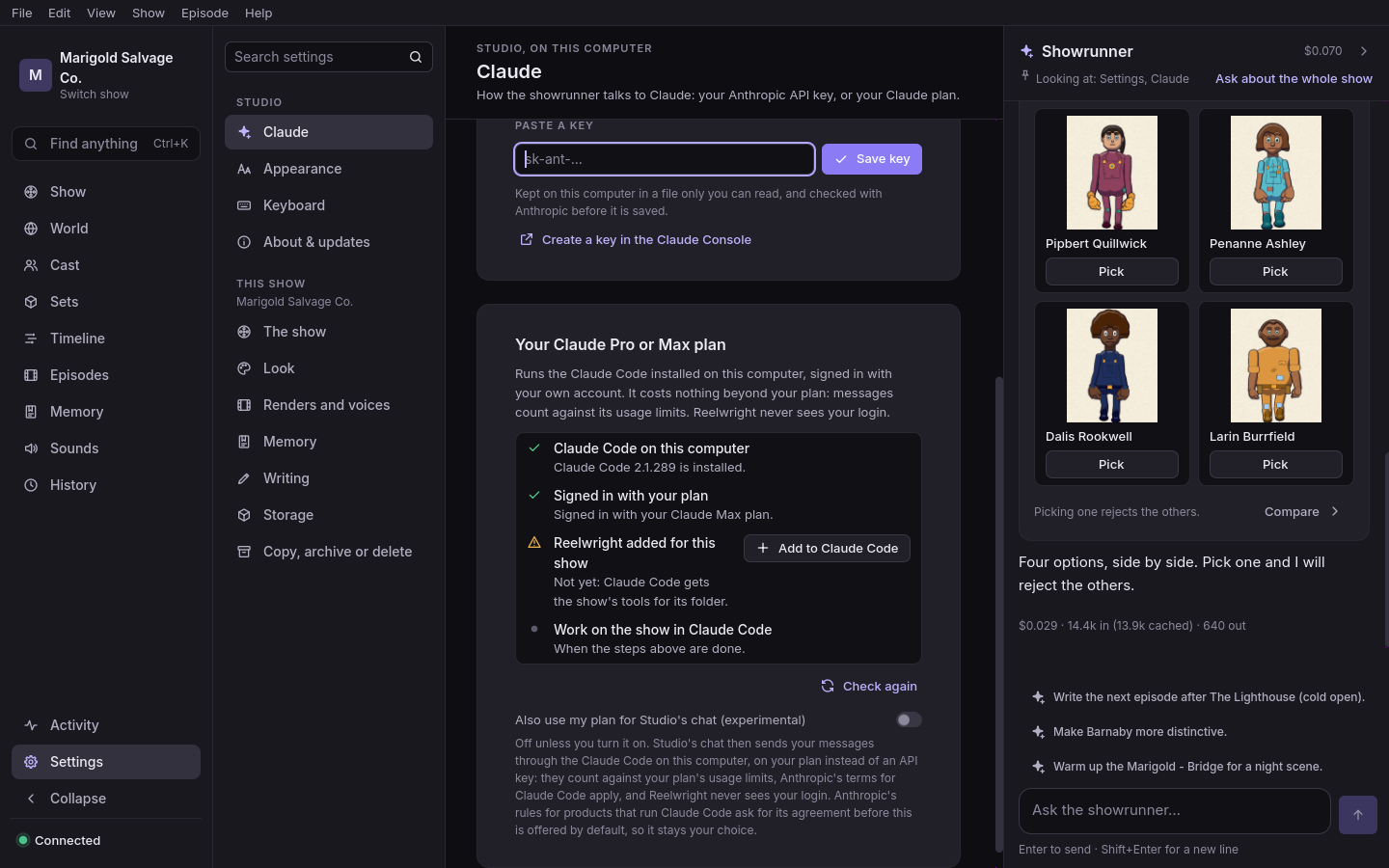
Studio's plan checklist runs these through the core its daemon command names
(RwUiSettings.core_command): Claude Code installed (with Anthropic's
install page when not), signed in with your plan
("Sign in…" opens claude login), Reelwright added for this show ("Add to Claude Code" runs
claude connect), then "Open in a terminal" (and "Open in the Claude app" on macOS and
Windows). The web edition has no Claude Code of its own to check: its "Use your Claude
subscription" gives the command that adds the service's MCP endpoint to the person's Claude Code
or Claude app instead (m12-remote-mcp.md), and the bridge for Studio's chat
(m12-plan-bridge.md).
What the MCP server does for this:
- Decisions ask you. Every decide tool (
approve_change,reject_change,undo,redo,lock,unlock) carries_meta: {"anthropic/requiresUserInteraction": true}, so Claude Code asks before each call, whatever its permission settings would allow, besides the "DECISION" warning in its description. - Proposals reach Studio live.
reelwright mcpis its own process and writes proposals to.reelwright/changes/<id>.json. The studio's file watcher, which ignores the rest of.reelwright/, watches those files and tells each change's new state once (change.event), so a proposal Claude Code makes appears in Studio as it is made, and a decision taken in one surface shows in the other.
Claude Desktop. A desktop extension (.mcpb) was considered and not built: an MCPB bundle
is a zip that contains its MCP server, and Reelwright's server is the installed reelwright
outside it, so a bundle would point at a program it does not hold. Add it by hand instead:
reelwright claude status --show <dir> prints the entry to put under "mcpServers" in Claude
Desktop's claude_desktop_config.json:
"reelwright": { "command": "/path/to/reelwright", "args": ["mcp", "--show", "/path/to/show"] }
Studio's chat on the plan (opt-in)
reelwright serve --show <dir> --claude-plan (core/src/claude/chat.ts, PlanChat): Studio
adds the flag only when its setting is on (RwUiSettings.claude_plan_chat, [claude] plan_chat, off by default), and only to a core's daemon command. A daemon the web service
starts carries REELWRIGHT_HOSTED=1 and refuses it.
- One process per chat session, in the show's folder:
claude -p --input-format stream-json --output-format stream-json --verbose --include-partial-messages --strict-mcp-config --mcp-config '<reelwright mcp for this show>' --tools "" --allowedTools "mcp__reelwright-chat__*" --disallowedTools <the decide tools> --permission-mode dontAsk --append-system-prompt-file <the showrunner's prompt and the show context>. Never--bare, which would skip Claude Code's own sign-in. No built-in tools: no shell, files or web. A cancelled turn ends with SIGINT; the next starts again with--resume <session>. The server is namedreelwright-chat, neverreelwright: Claude Code keeps a server's "needs authentication" by its name alone, in the person's own config folder, so their ownreelwrightwaiting for a sign-in would stop this chat's tools before they start. - The plan answers. Before the process starts,
claude auth statusmust reportauthMethod: "claude.ai", or"oauth_token"withCLAUDE_CODE_OAUTH_TOKENset (the plan's own token fromclaude setup-token, for a computer with no browser) and noANTHROPIC_AUTH_TOKEN; otherwise the turn ends withclaude.not_signed_in(orclaude.not_installed) and hello leaveschatout, so Studio offers Connect Claude.ANTHROPIC_API_KEYandANTHROPIC_AUTH_TOKENare left out of its environment, in this mode only. - The daemon's interface. The daemon talks to a
ChatAgent(canTalk,send,close): the API showrunner or this. Claude Code's stream becomes the same chat events: text as it streams, a tool card for eachmcp__reelwright-chat__call and its result, a proposal card for each change a propose tool made (read from the show's change store), thendone. There are no cost events: a plan is not billed per message. - Limits in plain words. A plan's limit ends the turn with
claude.rate_limited: "You have reached your Claude plan's five-hour usage limit for now; it resets at 3:00 PM, Oct 4. Wait until then, or switch Connect Claude to an Anthropic API key, which is billed separately as you go." (and that extra usage is out of credit, when it is). A reply that used the plan's extra usage says so. Other failures areclaude.billing,claude.overloaded,claude.tools_missing(the show's MCP server did not start),claude.exitedandclaude.failed.
Tests
core/test/claude.test.ts runs everything against a stand-in claude
(core/test/support/fake-claude.ts) on PATH: no network, no account, no model. Its turns
(core/test/fixtures/claude/plan-turns.json) are stream-json written from the Agent SDK's
message types, not recorded from a real session. core/test/studio.test.ts checks the watcher
hears another process's proposals; core/test/mcp-server.test.ts the decide tools' _meta;
core/test/anthropic-provider.test.ts and core/test/key.test.ts the refused tokens.
engine/tests/ui/rw_connect_dialog_test.gd drives the dialog against a stand-in core.